
In this post we take a look at four excellent, and popular, designs, from simple to complex, that can help inform your next blog design. The sites we’re going to look at are Lifehacker, PSD Tuts, Smashing Magazine and Canada’s National Post.
We’ll look at the general layout in great detail, via a wireframe of the main sections, and the details generally, with a bit of a writeup, in the form of notes, on what’s going on. Clicking on the wireframe opens up a full-size version. Feel free to use the wireframes in your own projects to help you get a handle on just where your stuff should be in a successful blog design.
Studying the masterworks and previous success is one of the key ways to breed success in your own designs. Let’s study up.
Lifehacker
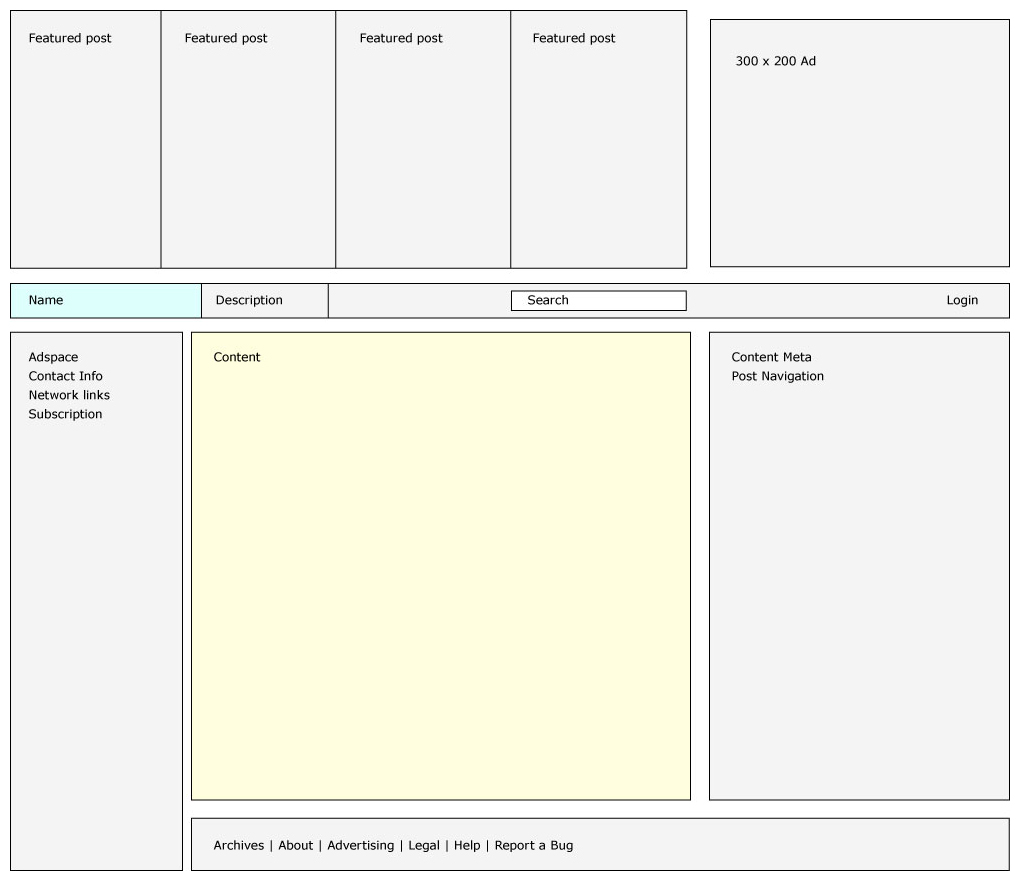
 My favorite thing about the Lifehacker template is the top posts of the day featured for maximum (literal, even) effect at the top of every page. Each featured item gets a thumbnail image, a category, a title and a cool hover effect.
The blog branding is almost a secondary item here but is still highlighted and serves to further highlight the search which is almost exactly in the middle of the above-the-fold screen. And note that the search takes up just as much visual area as the site logo. Can you make search anymore prominent? Anyway, the real Lifehacker brand is the reams and reams of excellent content. A fat logo and pretty header just gets in the way. In fact, all of the sites we’ll look at, mostly eschew cuteness and large headers that only serve to brand their site.
This is the only layout in this little study with a sidebar on the left. But the sidebar on the right is mostly negative space and really helps to focus your eye on what’s happening in the main content area.
PSD Tuts

The main content area of PSD Tuts (and all the ‘tuts sites) is a relatively massive 640px wide. PSD Tuts puts this to good use with post thumbnails and large images.
The category/page navigation is really well done with breadcrumbs, and drop down navigation sub-categories. It encourages further exploration into the site. And since the current version has been slightly reworked, in a recent network-wide redesign, from the previous iteration, I imagine it’s doing a good job of driving up pageviews and making the site stickier.
 The footer. Wow. PSD Tuts has a huge footer. It’s almost 640px high and at 1024px by 768px screen resolution takes up almost the whole screen. Does it work? Absolutely.
Smashing Magazine

Smashing Magazine, famous for pointing to examples of terrific design in huge long lists, has probably the most utilitarian design. Is it a masterwork? Not really. It’s a simple two-column/three-column design. But it does get out of the way and let the content do it’s thing.
 Probably the most bizarre thing about the site is the list of every post they’ve ever published in the sidebar. I don’t think I’ve ever seen that before. Would it be successful? I can imagine a new visitor really getting into the site and it’s heady series of lists and big images returning again and again to the list looking for something they’ve missed … which makes me think it’d be better as a page. Then again, there’s an SEO benefit here as well, having everyone of your pages inter-linked. It’s something to consider for your blog.
The National Post

The National Post is one of the best newspaper websites around and a good example of the magazine layout for a blog—only just try and pull it off without an army of writers. Which is something we should talk about before we think about using this for a blog design. Do you want your personal site to fail completley? Yes? Great. Adopt a magazine layout highlighting multiple categories, feature posts and lots of content. You may also enjoy heart attacks.
Do you have a 3-person blog publishing multiple pillar articles a day and want a better way to highlight your constantly changing content? The National Post site is a rich source of inspiration.
 The two coolest things here are happening at the bottom of the page. The alltop-like array of categories and RSS feeds (highlighted in pink on the wireframe) and the super-slick carousel of likely-to-be-popular articles. I love that carousel.
The Hot Tags in the header are another cool feature. Much smarter, and far more attractive, than a tag cloud.
What can we learn about blog design from successful sites?
A good design is designed around the content and how it’s published. Keep that in mind when you’re looking for inspiration from successful sites around the web.
What do you think? What makes these sites work? What doesn’t work? Can you think of any other sites that deserve a wireframe analysis?
 ThemeShaper
16 responses
[…] Blog Design That Works [ThemeShaper] — This post takes a look at four popular designs from blogs that are among the top – Lifehacker, PSD Tuts, Smashing Magazine, and Canada’s National Post. Ian provides a wireframe of the main sections for reference as to where you should be theoretically placing your content and sidebars as well as his personal thoughts on each design. Useful if you need to place a lot of content in your sidebars, thus opting for the “magazine” look for your blog. […]
[…] Blog Design that Works→ […]
[…] Blog Design That Works […]
[…] Italiano Categoria(s): Criação, Destaque, Interface 0 Comentários até agora. Em um artigo interessante do site Theme Shaper, que analisa os designs de alguns blogs […]
[…] Design blogs? Check out this article analyzing a couple of popular blogs, and why their blog design works. […]
Great article, thanks!
I have a website and i am planning to developed Blog, can some one support me how it works and in how many steps, i need your ideas.
Em a web desgnr.. If u need 2 develope da website/blog..
contact : vimaljosehere@gmail.com
[…] Blog Design That Works – […]
[…] Blog Design That Works […]
It’s a good one. some people are very talented in terms of theme making and designing. I appreciate it.
[…] 原文:Blog Design That Works […]
Very interesting, did not know much about this
To be honest, best layout is just singe column. Really. I go to blog for content, not advertisements, additional links. And I don’t need to be reminded to subscribe (If I liked blog, I’ll do it anyway).
Simple is best in my opinion. I think the number of people coming into the ‘building my first website’ arena is far greater than the existing number of bloggers/techies. What are most beginners looking for? Simplicity.
[…] Blog Design That Works […]