<?xml version="1.0" encoding="UTF-8"?><!-- generator="bbPress" -->

<rss version="2.0"
	xmlns:content="http://purl.org/rss/1.0/modules/content/"
	xmlns:dc="http://purl.org/dc/elements/1.1/"
>

<channel>
<title>ThemeShaper Forums: Forum: Acamas - Recent Posts</title>
<link>http://themeshaper.com/forums/</link>
<description>Help In Shaping WordPress Themes</description>
<language>en</language>
<pubDate>Tue, 21 May 2013 18:19:37 +0000</pubDate>

<item>
<title>jencc on "white outline on homepage"</title>
<link>http://themeshaper.com/forums/topic/white-outline-on-homepage#post-27475</link>
<pubDate>Tue, 10 Jul 2012 21:21:32 +0000</pubDate>
<dc:creator>jencc</dc:creator>
<guid isPermaLink="false">27475@http://themeshaper.com/forums/</guid>
<description>&#60;p&#62;Thank you! You are a magician! It just disappeared, and made me breathe easier. Have a wonderful day.&#60;/p&#62;
&#60;p&#62;Jen
&#60;/p&#62;</description>
</item>
<item>
<title>ScottNix on "white outline on homepage"</title>
<link>http://themeshaper.com/forums/topic/white-outline-on-homepage#post-27471</link>
<pubDate>Tue, 10 Jul 2012 16:22:22 +0000</pubDate>
<dc:creator>ScottNix</dc:creator>
<guid isPermaLink="false">27471@http://themeshaper.com/forums/</guid>
<description>&#60;p&#62;Just a heads up, the forums have moved to &#60;a href=&#34;http://thematictheme.com/forums/&#34; rel=&#34;nofollow&#34;&#62;http://thematictheme.com/forums/&#60;/a&#62;&#60;/p&#62;
&#60;p&#62;The problem you have is a an inheritance issue which I don't even want to attempt to explain (because I probably can't do it eloquently). &#60;/p&#62;
&#60;p&#62;Adding &#60;/p&#62;
&#60;pre&#62;&#60;code&#62;.home #content .aside { border: none; }&#60;/code&#62;&#60;/pre&#62;
&#60;p&#62;to your variant file will fix it, just make sure to add it below the &#34;#content .aside&#34; unless you aren't using the borders on any asides, then you can just add the border: none; to there instead.
&#60;/p&#62;</description>
</item>
<item>
<title>jencc on "white outline on homepage"</title>
<link>http://themeshaper.com/forums/topic/white-outline-on-homepage#post-27469</link>
<pubDate>Tue, 10 Jul 2012 06:25:41 +0000</pubDate>
<dc:creator>jencc</dc:creator>
<guid isPermaLink="false">27469@http://themeshaper.com/forums/</guid>
<description>&#60;p&#62;Can anyone help me identify where I can fix an outline that is appearing on the home page of this site:&#60;/p&#62;
&#60;p&#62;&#60;a href=&#34;http://www.greatfeelingfoods.com&#34; rel=&#34;nofollow&#34;&#62;http://www.greatfeelingfoods.com&#60;/a&#62;&#60;/p&#62;
&#60;p&#62;It appears to be outlining the Blog or posts heading, but I have tried modifying everything I can think of and nothing makes it disappear. Help!&#60;/p&#62;
&#60;p&#62;Jen
&#60;/p&#62;</description>
</item>
<item>
<title>helgatheviking on "audio next to front page post titles"</title>
<link>http://themeshaper.com/forums/topic/audio-next-to-front-page-post-titles#post-24713</link>
<pubDate>Sat, 07 Jan 2012 14:50:51 +0000</pubDate>
<dc:creator>helgatheviking</dc:creator>
<guid isPermaLink="false">24713@http://themeshaper.com/forums/</guid>
<description>&#60;p&#62;yes it is possible.  you can add anything you want just about anywhere you want.  sounds like you will want to filter the post titles.  &#60;/p&#62;
&#60;p&#62;this type of questions gets asked over and over, so i will refer you to my general explanation of how filters (and hooks) work&#60;/p&#62;
&#60;p&#62;&#60;a href=&#34;http://themeshaper.com/forums/topic/need-help-understanding-actions-vs-filters-and-changing-post-meta-and-utility#post-22638&#34; rel=&#34;nofollow&#34;&#62;http://themeshaper.com/forums/topic/need-help-understanding-actions-vs-filters-and-changing-post-meta-and-utility#post-22638&#60;/a&#62;
&#60;/p&#62;</description>
</item>
<item>
<title>Desperaudio on "audio next to front page post titles"</title>
<link>http://themeshaper.com/forums/topic/audio-next-to-front-page-post-titles#post-24702</link>
<pubDate>Fri, 06 Jan 2012 19:35:26 +0000</pubDate>
<dc:creator>Desperaudio</dc:creator>
<guid isPermaLink="false">24702@http://themeshaper.com/forums/</guid>
<description>&#60;p&#62;My posts each contain text and a single audio file (mp3).  Is it possible to make the HTML5 audio player show up on the front page, next to each post title?&#60;/p&#62;
&#60;p&#62;Thanks.
&#60;/p&#62;</description>
</item>
<item>
<title>helgatheviking on "acamas home page loop"</title>
<link>http://themeshaper.com/forums/topic/acamas-home-page-loop#post-24430</link>
<pubDate>Tue, 20 Dec 2011 20:18:51 +0000</pubDate>
<dc:creator>helgatheviking</dc:creator>
<guid isPermaLink="false">24430@http://themeshaper.com/forums/</guid>
<description>&#60;p&#62;boo yeah, i'm a mod. don't think i can delete a user, but see ya spam post.
&#60;/p&#62;</description>
</item>
<item>
<title>hierophant on "acamas home page loop"</title>
<link>http://themeshaper.com/forums/topic/acamas-home-page-loop#post-24429</link>
<pubDate>Tue, 20 Dec 2011 19:24:36 +0000</pubDate>
<dc:creator>hierophant</dc:creator>
<guid isPermaLink="false">24429@http://themeshaper.com/forums/</guid>
<description>&#60;p&#62;maybe the 'simply exclude' plug in will do the trick.
&#60;/p&#62;</description>
</item>
<item>
<title>helgatheviking on "acamas home page loop"</title>
<link>http://themeshaper.com/forums/topic/acamas-home-page-loop#post-24397</link>
<pubDate>Tue, 20 Dec 2011 05:04:08 +0000</pubDate>
<dc:creator>helgatheviking</dc:creator>
<guid isPermaLink="false">24397@http://themeshaper.com/forums/</guid>
<description>&#60;p&#62;i asked ian to make me a mod.  hopefully he'll do it tomorrow.
&#60;/p&#62;</description>
</item>
<item>
<title>sfrangos on "acamas home page loop"</title>
<link>http://themeshaper.com/forums/topic/acamas-home-page-loop#post-24394</link>
<pubDate>Mon, 19 Dec 2011 23:28:16 +0000</pubDate>
<dc:creator>sfrangos</dc:creator>
<guid isPermaLink="false">24394@http://themeshaper.com/forums/</guid>
<description>&#60;p&#62;Will a moderator please DELETE &#34;latnemele&#34; for Spam?  Thanks.
&#60;/p&#62;</description>
</item>
<item>
<title>hierophant on "How to remove "comment" box from Pages"</title>
<link>http://themeshaper.com/forums/topic/how-to-remove-comment-box-from-pages#post-24021</link>
<pubDate>Thu, 01 Dec 2011 04:21:04 +0000</pubDate>
<dc:creator>hierophant</dc:creator>
<guid isPermaLink="false">24021@http://themeshaper.com/forums/</guid>
<description>&#60;p&#62;OK I got it. &#60;a href=&#34;http://wordpress.org/support/topic/remove-comment-field-for-selected-pages&#34; rel=&#34;nofollow&#34;&#62;http://wordpress.org/support/topic/remove-comment-field-for-selected-pages&#60;/a&#62;
&#60;/p&#62;</description>
</item>
<item>
<title>hierophant on "How to remove "comment" box from Pages"</title>
<link>http://themeshaper.com/forums/topic/how-to-remove-comment-box-from-pages#post-24008</link>
<pubDate>Wed, 30 Nov 2011 08:35:33 +0000</pubDate>
<dc:creator>hierophant</dc:creator>
<guid isPermaLink="false">24008@http://themeshaper.com/forums/</guid>
<description>&#60;p&#62;I could not locate any reference to this in the acamas forum posts.&#60;/p&#62;
&#60;p&#62;Title pretty much sums up what I wish to achieve. &#60;/p&#62;
&#60;p&#62;I suppose it will mean editing one of the files? Or perhaps adding something to the 'Variants&#34; file.&#60;/p&#62;
&#60;p&#62;Thanks.
&#60;/p&#62;</description>
</item>
<item>
<title>Chris on "License for Acamas"</title>
<link>http://themeshaper.com/forums/topic/license-for-acamas#post-22232</link>
<pubDate>Fri, 08 Jul 2011 12:01:58 +0000</pubDate>
<dc:creator>Chris</dc:creator>
<guid isPermaLink="false">22232@http://themeshaper.com/forums/</guid>
<description>&#60;p&#62;It's GPL 2.&#60;/p&#62;
&#60;p&#62;Chris
&#60;/p&#62;</description>
</item>
<item>
<title>huyz on "License for Acamas"</title>
<link>http://themeshaper.com/forums/topic/license-for-acamas#post-22173</link>
<pubDate>Wed, 06 Jul 2011 13:23:51 +0000</pubDate>
<dc:creator>huyz</dc:creator>
<guid isPermaLink="false">22173@http://themeshaper.com/forums/</guid>
<description>&#60;p&#62;What is the license for Acamas, the Thematic child theme?&#60;/p&#62;
&#60;p&#62;I see that one point it was premium but now it's free, right?&#60;/p&#62;
&#60;p&#62;I'd like to release some of my modifications to the public, so I'd like to know what open source license to use.
&#60;/p&#62;</description>
</item>
<item>
<title>huyz on "Acamas Variant CSS code doesn't work in multisite"</title>
<link>http://themeshaper.com/forums/topic/acamas-variant-css-code-doesnt-work-in-multisite#post-22042</link>
<pubDate>Sun, 26 Jun 2011 14:11:41 +0000</pubDate>
<dc:creator>huyz</dc:creator>
<guid isPermaLink="false">22042@http://themeshaper.com/forums/</guid>
<description>&#60;p&#62;I'm using Acamas 1.0.2 in WordPress 3.0.5 running as multisite.&#60;/p&#62;
&#60;p&#62;The problem with multisite is that any customization of the theme must be blog-specific -- otherwise, dropping in acamas-variant will affect all blogs which have the acamas theme selected.  So the code can't look for &#60;code&#62;acamas-variant/&#60;/code&#62; in the shared &#60;code&#62;wp-content/&#60;/code&#62; directory.&#60;/p&#62;
&#60;p&#62;As a workaround, since in my setup I always copy any theme that I want to customize for one blog (so that the untouched original theme is still available for other blogs to select), I chose to make the code look for &#60;code&#62;acamas-variant/&#60;/code&#62; inside the theme's directory itself.&#60;/p&#62;
&#60;p&#62;So I changed &#60;code&#62;acamas_variantcss()&#60;/code&#62; to have:&#60;br /&#62;
&#60;pre&#62;&#60;code&#62;$variantcss_path = dirname( __FILE__ ) . &#38;#39;/acamas-variant/variant.css&#38;#39;;

    if (file_exists($variantcss_path)) { ?&#38;gt;
        &#38;lt;!-- Custom CSS --&#38;gt;
        &#38;lt;link rel=&#38;quot;stylesheet&#38;quot; type=&#38;quot;text/css&#38;quot; href=&#38;quot;&#38;lt;?php echo dirname( get_bloginfo(&#38;#39;stylesheet_url&#38;#39;) ) ?&#38;gt;/acamas-variant/variant.css&#38;quot; /&#38;gt;
    &#38;lt;?php }&#60;/code&#62;&#60;/pre&#62;
&#60;p&#62;By the way, in the original code for that function, I don't know the difference between checking for &#60;code&#62;variantcss_path&#60;/code&#62; and &#60;code&#62;variantcss_url&#60;/code&#62;: unless I can't read properly, the CSS link that is output is the same for both anyway.  I don't know if that's intended or not.
&#60;/p&#62;</description>
</item>
<item>
<title>huyz on "Acamas options"</title>
<link>http://themeshaper.com/forums/topic/acamas-options#post-22041</link>
<pubDate>Sun, 26 Jun 2011 13:52:37 +0000</pubDate>
<dc:creator>huyz</dc:creator>
<guid isPermaLink="false">22041@http://themeshaper.com/forums/</guid>
<description>&#60;p&#62;You may be suffering from the same problem I was.&#60;br /&#62;
So check out &#60;a href=&#34;http://themeshaper.com/forums/topic/acamas-options-menu-is-missing&#34; rel=&#34;nofollow&#34;&#62;http://themeshaper.com/forums/topic/acamas-options-menu-is-missing&#60;/a&#62;
&#60;/p&#62;</description>
</item>
<item>
<title>huyz on ""Acamas Options" menu is missing (+ workaround)"</title>
<link>http://themeshaper.com/forums/topic/acamas-options-menu-is-missing#post-22040</link>
<pubDate>Sun, 26 Jun 2011 13:51:45 +0000</pubDate>
<dc:creator>huyz</dc:creator>
<guid isPermaLink="false">22040@http://themeshaper.com/forums/</guid>
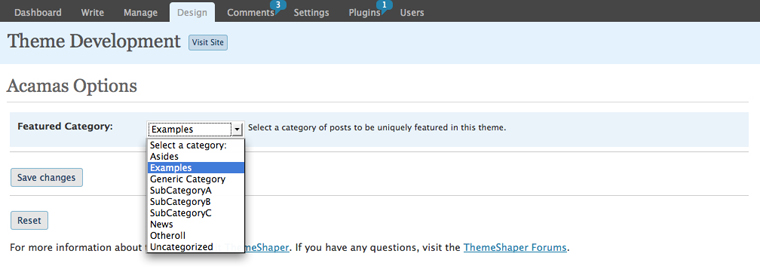
<description>&#60;p&#62;When I installed Acamas 1.0.2 on WordPress 3.0.5 running as a multisite, there was no &#34;Acamas Options&#34; menu to set the Featured Category.  This pretty much broke the theme as Acamas won't run properly without this setting.&#60;/p&#62;
&#60;p&#62;I had to change this line in &#60;code&#62;functions.php&#60;/code&#62;:&#60;br /&#62;
&#60;code&#62;add_theme_page($childthemename.&#38;quot; Options&#38;quot;, &#38;quot;$childthemename Options&#38;quot;, &#38;#39;edit_themes&#38;#39;, basename(__FILE__), &#38;#39;childtheme_admin&#38;#39;);&#60;/code&#62;&#60;br /&#62;
to&#60;br /&#62;
&#60;code&#62;add_theme_page($childthemename.&#38;quot; Options&#38;quot;, &#38;quot;$childthemename Options&#38;quot;, &#38;#39;edit_theme_options&#38;#39;, basename(__FILE__), &#38;#39;childtheme_admin&#38;#39;);&#60;/code&#62;&#60;/p&#62;
&#60;p&#62;I don't know what the difference between edit_themes and edit_theme_options is, but maybe this has to do with multisite.
&#60;/p&#62;</description>
</item>
<item>
<title>ScottNix on "acamas problems after upgrade"</title>
<link>http://themeshaper.com/forums/topic/acamas-problems-after-upgrade#post-20797</link>
<pubDate>Sat, 23 Apr 2011 20:14:01 +0000</pubDate>
<dc:creator>ScottNix</dc:creator>
<guid isPermaLink="false">20797@http://themeshaper.com/forums/</guid>
<description>&#60;p&#62;Check the CSS (line 280) on style.css, looks like it is set to display none.&#60;/p&#62;
&#60;p&#62;&#60;code&#62;&#60;br /&#62;
.home .entry-content, .home .entry-meta, .home .entry-utility {&#60;br /&#62;
    display: none;&#60;br /&#62;
}&#60;br /&#62;
&#60;/code&#62;&#60;/p&#62;
&#60;p&#62;That is the culprit, however not sure why a WP upgrade would cause that.
&#60;/p&#62;</description>
</item>
<item>
<title>hmbullet on "acamas problems after upgrade"</title>
<link>http://themeshaper.com/forums/topic/acamas-problems-after-upgrade#post-20793</link>
<pubDate>Sat, 23 Apr 2011 16:57:47 +0000</pubDate>
<dc:creator>hmbullet</dc:creator>
<guid isPermaLink="false">20793@http://themeshaper.com/forums/</guid>
<description>&#60;p&#62;I am using Acamas 1.0.2 and recently upgraded to Wordpress 3.1.1. When I upgraded the posts directly below the header disappeared. When I post new posts the title of my post no longer shows up below the header. The new post shows up in latest features and the older article moves to the archive section in the header, but directly below the header to the left of the primary aside and secondary aside there is just white space. If I write something very brief it shows up below, but all of my long articles no longer go to that area. I just did a Test Post with very little information and it ended up below the header. Is this a setting issue? Does anyone know why this changed with the update?&#60;/p&#62;
&#60;p&#62;update: So if I don't select a category the post goes below the header but not in the latest feature section. If I assign categories to my post it goes into the feature section but not below the latest feature header it did not do this before my upgrade to the latest version of Wordpress. I would like all of my posts to show up directly below the header like they did. If anyone has any info on this I would appreciate it
&#60;/p&#62;</description>
</item>
<item>
<title>helgatheviking on "Disabling automatic em dashes in Acamas?"</title>
<link>http://themeshaper.com/forums/topic/disabling-automatic-em-dashes-in-acamas#post-20488</link>
<pubDate>Tue, 12 Apr 2011 07:35:01 +0000</pubDate>
<dc:creator>helgatheviking</dc:creator>
<guid isPermaLink="false">20488@http://themeshaper.com/forums/</guid>
<description>&#60;p&#62;eeek... hacking at core.  but i guess there was no other way? just remember that you will lose this the next time you update WP.  don't forget to mark as resolved.
&#60;/p&#62;</description>
</item>
<item>
<title>ilford on "Disabling automatic em dashes in Acamas?"</title>
<link>http://themeshaper.com/forums/topic/disabling-automatic-em-dashes-in-acamas#post-20469</link>
<pubDate>Tue, 12 Apr 2011 00:13:03 +0000</pubDate>
<dc:creator>ilford</dc:creator>
<guid isPermaLink="false">20469@http://themeshaper.com/forums/</guid>
<description>&#60;p&#62;hi helga, &#60;/p&#62;
&#60;p&#62;thank you for the pointer!  I actually changed a line in wp-includes/formatting.php &#60;/p&#62;
&#60;p&#62;$static_characters = array_merge(array('---', ' -- ', '--', '-', 'xn&#38;#8211;', '...', '&#60;code&#62;&#60;/code&#62;', '\'\'', ' (tm)'), $cockney);&#60;br /&#62;
to&#60;/p&#62;
&#60;p&#62;$static_characters = array_merge(array('---', ' -- ', '--', 'xn&#38;#8211;', '...', '&#60;code&#62;&#60;/code&#62;', '\'\'', ' (tm)'), $cockney);
&#60;/p&#62;</description>
</item>
<item>
<title>helgatheviking on "Disabling automatic em dashes in Acamas?"</title>
<link>http://themeshaper.com/forums/topic/disabling-automatic-em-dashes-in-acamas#post-20369</link>
<pubDate>Thu, 07 Apr 2011 09:25:19 +0000</pubDate>
<dc:creator>helgatheviking</dc:creator>
<guid isPermaLink="false">20369@http://themeshaper.com/forums/</guid>
<description>&#60;p&#62;from a quick google search i think it is default WP behavior and not Acamas/thematic specific  &#60;/p&#62;
&#60;p&#62;&#60;a href=&#34;http://www.google.com/search?sourceid=chrome&#38;#38;ie=UTF-8&#38;#38;q=wordpress+automatically+uses+em+dashes&#34; rel=&#34;nofollow&#34;&#62;http://www.google.com/search?sourceid=chrome&#38;#38;ie=UTF-8&#38;#38;q=wordpress+automatically+uses+em+dashes&#60;/a&#62;&#60;/p&#62;
&#60;p&#62;the first result explains things pretty well.  the 3rd result points to an old WP support post- which led me to dig around in the wp-includes/formatting.php file.  there appears to be a no_texturize_tags filter that &#60;em&#62;might&#60;/em&#62; be useful.
&#60;/p&#62;</description>
</item>
<item>
<title>ilford on "Disabling automatic em dashes in Acamas?"</title>
<link>http://themeshaper.com/forums/topic/disabling-automatic-em-dashes-in-acamas#post-20355</link>
<pubDate>Wed, 06 Apr 2011 22:38:01 +0000</pubDate>
<dc:creator>ilford</dc:creator>
<guid isPermaLink="false">20355@http://themeshaper.com/forums/</guid>
<description>&#60;p&#62;Hi,&#60;/p&#62;
&#60;p&#62;I've been using the Acamas theme for the internal blog at my company (the blog is hosted on an internal server so I can't provide a link).&#60;/p&#62;
&#60;p&#62;My issue: apparently Acamas automatically converts normal dashes to em dashes. This causes trouble because we post paths to files (ie C:/MyDocuments/2011 - Folder). &#60;/p&#62;
&#60;p&#62;How can I disable Acamas from automatically using em dashes? &#60;/p&#62;
&#60;p&#62;As a fan of typography this is painful but necessary.&#60;/p&#62;
&#60;p&#62;&#60;a href=&#34;http://imgur.com/rSFf3&#34; rel=&#34;nofollow&#34;&#62;http://imgur.com/rSFf3&#60;/a&#62;
&#60;/p&#62;</description>
</item>
<item>
<title>helgatheviking on "Two questions: Acamas theme"</title>
<link>http://themeshaper.com/forums/topic/two-questions-acamas-theme#post-20332</link>
<pubDate>Wed, 06 Apr 2011 06:45:52 +0000</pubDate>
<dc:creator>helgatheviking</dc:creator>
<guid isPermaLink="false">20332@http://themeshaper.com/forums/</guid>
<description>&#60;p&#62;1. of course it is possible, but 1. i don't have acamas and 2. your question is vague and doesn't show any code for me to critique.&#60;/p&#62;
&#60;p&#62;2. premiumpixels is gorgeous.  please use something like chrome's developer tools or &#60;a href=&#34;http://getfirebug.com&#34; rel=&#34;nofollow&#34;&#62;http://getfirebug.com&#60;/a&#62; to look at how he is achieving that.  first you are going to need to re-create the markup... which could be difficult.  &#60;/p&#62;
&#60;pre&#62;&#60;code&#62;&#38;lt;li&#38;gt;&#38;lt;a&#38;gt;&#38;lt;span&#38;gt;Home&#38;lt;/span&#38;gt;&#38;lt;/a&#38;gt;&#38;lt;/li&#38;gt;&#60;/code&#62;&#60;/pre&#62;
&#60;p&#62;notice that he has an extra span.  this is important b/c the triangle is on the a element and the underline is on the span.  you could either do a hard-coded menu OR you'd need to create a custom walker.  see my post on menus:&#60;/p&#62;
&#60;p&#62;&#60;a href=&#34;http://themeshaper.com/forums/topic/thematic-menus-demystified-1&#34; rel=&#34;nofollow&#34;&#62;http://themeshaper.com/forums/topic/thematic-menus-demystified-1&#60;/a&#62;
&#60;/p&#62;</description>
</item>
<item>
<title>Queequeg on "Two questions: Acamas theme"</title>
<link>http://themeshaper.com/forums/topic/two-questions-acamas-theme#post-20303</link>
<pubDate>Tue, 05 Apr 2011 10:28:27 +0000</pubDate>
<dc:creator>Queequeg</dc:creator>
<guid isPermaLink="false">20303@http://themeshaper.com/forums/</guid>
<description>&#60;p&#62;Hi!&#60;/p&#62;
&#60;p&#62;My question is in two parts:&#60;/p&#62;
&#60;p&#62;1. I'm looking for a different way to display feature posts, as I do not have many of them. Is there an easy way I could replace the entire 'feature' section (that would show on the home page only) with a slider? Or, perhaps style the section so it displays 3-4 thumbnails horizontally that link to each feature post?&#60;/p&#62;
&#60;p&#62;2. I will admit, I am terrible when it comes to CSS sometimes, and this is one of those times. I have the Acamas theme installed, and would love to style the menu so it looks similar to the one used in the current version of &#60;a href=&#34;http://premiumpixels.com&#34; rel=&#34;nofollow&#34;&#62;http://premiumpixels.com&#60;/a&#62; -- see how there is the little triangle image &#38;#38; black border underneath the current page?&#60;/p&#62;
&#60;p&#62;I'd love some help... and I apologize for asking what may possibly be such a simple question. I have been sitting here trying various methods, and I just can't figure it out. Thanks.
&#60;/p&#62;</description>
</item>
<item>
<title>amoore on "acamas home page loop"</title>
<link>http://themeshaper.com/forums/topic/acamas-home-page-loop#post-19538</link>
<pubDate>Sun, 06 Mar 2011 15:50:01 +0000</pubDate>
<dc:creator>amoore</dc:creator>
<guid isPermaLink="false">19538@http://themeshaper.com/forums/</guid>
<description>&#60;p&#62;Hoping someone can help - &#60;/p&#62;
&#60;p&#62;Just noticed that, since the 3.1 wordpress update, the home page loop on the acamas site is not excluding the featured category anymore. &#60;/p&#62;
&#60;p&#62;I'm not sure what is solving the issue. Any ideas on how to solve this?&#60;/p&#62;
&#60;p&#62;The site is:&#60;br /&#62;
&#60;a href=&#34;http://nightsatghettoshul.com/&#34; rel=&#34;nofollow&#34;&#62;http://nightsatghettoshul.com/&#60;/a&#62;&#60;/p&#62;
&#60;p&#62;Thank you!&#60;br /&#62;
Avia
&#60;/p&#62;</description>
</item>
<item>
<title>edb on "how to add ShareThis plugin to post meta data line at top of post"</title>
<link>http://themeshaper.com/forums/topic/how-to-add-sharethis-plugin-to-post-meta-data-line-at-top-of-post#post-18075</link>
<pubDate>Mon, 03 Jan 2011 13:43:33 +0000</pubDate>
<dc:creator>edb</dc:creator>
<guid isPermaLink="false">18075@http://themeshaper.com/forums/</guid>
<description>&#60;p&#62;Hello,&#60;/p&#62;
&#60;p&#62;I am relatively new to wordpress and php coding. I recently discovered the wonderful thematic wp theme, and am currently using the acamas child theme for my site. I have found the customization to be very convenient and easy to use.&#60;/p&#62;
&#60;p&#62;However, I have recently added the ShareThis plugin, which does not show up in the widgets panel. Instead, it has the option to automatically add the link button to the end of the post. Is there any way to also add it to the beginning of the post, at the end of the post meta data author and date line? Also, the ShareThis link button appears in the latest featured post box on the homepage, which i do not want. is there any way to remove it from that page only? I have tried looking up solutions online, which involve hacking into the acamas functions.php file, but have not had any success.&#60;/p&#62;
&#60;p&#62;thanks in advance for your help!
&#60;/p&#62;</description>
</item>
<item>
<title>akexfregon on "Acamas: Header image, blog title and image thumbnails"</title>
<link>http://themeshaper.com/forums/topic/acamas-header-image-blog-title-and-image-thumbnails#post-17888</link>
<pubDate>Wed, 22 Dec 2010 04:21:38 +0000</pubDate>
<dc:creator>akexfregon</dc:creator>
<guid isPermaLink="false">17888@http://themeshaper.com/forums/</guid>
<description>&#60;p&#62;Hi,&#60;/p&#62;
&#60;p&#62;I also want to include a picture in the featured post section of my front page. I've added the code above into my functions.php file, but I don't understand exactly how it works. Can someone help me with this?
&#60;/p&#62;</description>
</item>
<item>
<title>akexfregon on "Adding excerpts to post titles on home page"</title>
<link>http://themeshaper.com/forums/topic/adding-excerpts-to-post-titles-on-home-page#post-17869</link>
<pubDate>Tue, 21 Dec 2010 10:33:58 +0000</pubDate>
<dc:creator>akexfregon</dc:creator>
<guid isPermaLink="false">17869@http://themeshaper.com/forums/</guid>
<description>&#60;p&#62;Can this be done by changing some of the CSS? Or does it require complicated coding ...
&#60;/p&#62;</description>
</item>
<item>
<title>akexfregon on "Acamas variant.css file not visible in WordPress"</title>
<link>http://themeshaper.com/forums/topic/acamas-variantcss-file-not-visible-in-wordpress#post-17853</link>
<pubDate>Mon, 20 Dec 2010 12:52:46 +0000</pubDate>
<dc:creator>akexfregon</dc:creator>
<guid isPermaLink="false">17853@http://themeshaper.com/forums/</guid>
<description>&#60;p&#62;Hi,&#60;/p&#62;
&#60;p&#62;I have just uploaded the acamas-varianr folder to my wp-content folder, but when I go to Appearance&#38;gt;Editor in my WordPress dashboard I can't see the variant.css file there to edit ... Am I doing something wrong? Or can I just edit the other CSS files now instead?
&#60;/p&#62;</description>
</item>
<item>
<title>maja62 on "Avatar is distorted after installing Acamas theme"</title>
<link>http://themeshaper.com/forums/topic/avatar-is-distorted-after-installing-acamas-theme#post-17648</link>
<pubDate>Thu, 09 Dec 2010 16:18:25 +0000</pubDate>
<dc:creator>maja62</dc:creator>
<guid isPermaLink="false">17648@http://themeshaper.com/forums/</guid>
<description>&#60;p&#62;Thanks for responding. I am thinking this is a IE8 issue, since you report Safari views ok, and FoxFire is shows the avatar correctly.
&#60;/p&#62;</description>
</item>

</channel>
</rss>