LaunchPad, The WordPress Domain Parking Theme

LaunchPad, The WordPress Domain Parking Theme

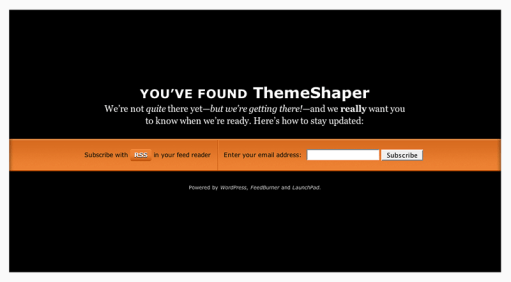
If you’re like me, you like registering domains. It’s exciting. But what’s not exciting is watching your hosting company or domain registrar turn your name into an ad-farm while you’re getting ready to launch your next WordPress blog. If you didn’t know it, that’s called domain parking; a way for hosts and domain registrars to capitalize on all the underdeveloped domains out there. That’s why I came up with LaunchPad, the WordPress Domain Parking Theme. To explain: if this theme had a motto it might be, “I’m not your billboard.”

Now with most hosts offering one-click installs of WordPress—I recommend Fused Network—it couldn’t be easier to park your domain in style while you get your future blog ready. Just install WordPress, sign up for FeedBurner with email subscriptions (see instructions below) and you’re set! You get a professionally designed domain parking page—for free—that serves up an RSS feed link and a form for email updates.

But why bother? Well, let’s see what web design expert Mr. Meltdown, of Design Meltdown, thinks of “coming soon” pages like LaunchPad.

This type of landing page has dropped the annoying construction cones and replaced with relevant and useful features. Namely among this is a sign up form to be notified of an actual launch, beta release, or other significant milestone. And of course this is a great way to build a nice mailing list of people to market a new product to. After all, if they actually complete the form they are likely to be very interested. Link.

Sounds like a good idea to me!

LaunchPad Features

  • Theme Options Page
  • Integration with FeedBurner
  • Professional design and typesetting
  • GPL Licensed—it’s free and you’re free to mess with it.

LaunchPad Instructions

Using LaunchPad is simple, it installs like any other WordPress theme, but there’s a couple of things you’ll need to get ready beforehand.

Get a FeedBurner ID and Feedmail

For a theme that incorporates FeedBurner to build subscriptions before you’ve even started blogging, this one is necessary. Signing up for FeedBurner is easy and you were probably going to do it anyway. Visit FeedBurner.com and follow the instructions there. Once that’s done, login and visit your account page.

All you’ll need is the name of your FeedBurner feed address. That’s the text after “http://feeds2.feedburner.com/”. Copy it into a text file somewhere for easy reference.

While you’re here, sign up for Feedmail. Click the publicize tab and look for the Email Subscriptions link under services (as I write this, it’s the 4th item). Follow the setup instructions there—but don’t worry about pasting any code anywhere, LaunchPad does that all for you.

Credit has to go to Nathan Rice for showing me how to do this with his beautiful theme Elegant Blue. Thanks, Nathan!

Write your Welcome Post

When someone subscribes to your new blog with RSS they will be able to read any published posts. You don’t want them reading your “Hello World!” post. Write a simple introduction to your new blog that outlines it’s genesis and your goals so your new subscribers will have something to read.

Set Theme Options

Simply copy your feed name into the options page …

… and You’re Done! You’re ready to launch your blog with LaunchPad!

Tips for Launching Your WordPress Blog with LaunchPad

There is really only one crucial tip for making the most of LaunchPad: let people know you have a URL. WordPress themes don’t work magic. You still have to market yourself. I recommend doing it in stages. First let your immediate friends and family know, then send out word on any social sites (like Facebook, LinkedIn, Hello Kitty Fan Club, etc.) you’re a member of. Follow that up with a link on an existing blog—if you have one. If you don’t have a blog I recommend getting one—using LaunchPad while you’re getting it ready of course!

Speaking of getting ready, make sure you read Collis Ta’eed’s two part Building a SuperBlog series on NorthXEast (Part two is here). It outlines the steps Collis took when launching FreelanceSwitch and his advice will help anyone launch their blog successfully. Without my LaunchPad theme, even. Imagine!

View the live demo or download.

Translations

Ports

340 thoughts on “LaunchPad, The WordPress Domain Parking Theme

  1. This is neat, Ian. I’ll be trying it out soon…

    I would imagine it provides good motivation for pushing through a design as you see people signing up to be notified of its launch.

  2. Can’t wait to see what you’re launching, David. And, yeah it is kind of motivating. Surprising too. I had more subscriptions by email than feed reader.

  3. What an excellent idea! I’ll be using it for a planned local magazine type site. Thanks for thinking of this!

  4. Pingback: WPDesigner » LaunchPad WordPress Theme

  5. Pingback: El theme LaunchPad para WordPress | La brujula verde

  6. Pingback: John Bowersox » Blog Archive » links for 2008-01-29

  7. Pingback: LaunchPad Theme for WordPress

  8. Pingback: Skylog » Blog Archive » links for 2008-01-30

  9. Pingback: LaunchPad, Theme WordPress para esos proyectos que aun no están listos para ser lanzados « Xyberneticos

  10. Pingback: LaunchPad, tema para antes de comenzar con tu dominios en WordPress » Cosas sencillas

  11. Pingback: LaunchPad, tema de Wordpress para sitios en construcción

  12. Pingback: maestroalberto » LaunchPad: tema WordPress per siti web in costruzione

  13. Pingback: Plantillas para Blogger, recursos y herramientas » Theme para Wordpress LaunchPad. Anuncia el lanzamiento de tu blog con un estilo único.

  14. simple yet effective it’s amazing how some theme’s just click, i know you can’t class this as a ‘theme’ but it does ‘exactly what it say’s on the tin’ :) Thanks!

  15. Pingback: WPCandy » WordPress Themes for 02/04

  16. Thanks, Roger, I really—wait a minute, scuba-diving in Egypt (check out Roger’s blog)! That’s Harry Houdini stuff! I bet you don’t get bored much, Roger.

  17. :) it’s amazing how the ‘timing’ of a sentence can make you chuckle, like your last one made me :) no no boredom here swapped selling software in London for diving in Egypt five years ago and have never looked back:)

    ps why don’t theme builder’s build into their theme’s simple option’s like the custom rss address and email that you have would make it easier for us non techie’s instead of digging into code we then break many times before we get it right!!

  18. “ps why don’t theme builder’s build into their theme’s simple option’s like the custom rss address and email that you have?”

    Mainly because it’s slightly confusing and not exactly easy. I barely understand it, myself and like I mentioned above, I only got it to work after following Nathan Rice’s example.

  19. Pingback: Quick n’ Dirty Offline Status

  20. a clever theme!

    the funny thing when I (obviously scanning and not reading the details) checked the demo page, my initial thought was “what? So the demo section is not yet done, I guess I’ll check back later…”. Foolishly not knowing that that’s what exactly the theme’s purpose.

    Respect :)

  21. Thanks, Hafiz. I just subscribed to your blog three days ago, by the way. Great stuff there.

  22. Pingback: LaunchPad WordPress Theme | Blog Themes Plus

  23. Pingback: Marketvice » Blog Archive » Park Your Domains with Wordpress

  24. Pingback: LaunchPad WordPress Theme | Best WordPress Themes and Plugins « Pimp WordPress

  25. Pingback:   Odd but Brilliant Uses for WordPress (Twitter, Contact Manager, Domain Parking) by Free WordPress Themes Blog

  26. Pingback: Weblog Tools Collection » Blog Archive » WordPress Theme Releases for 2/14

  27. Pingback: links for 2008-02-15

  28. Pingback: LaunchPad, The WordPress Domain Parking Theme

  29. Thank you for this. One small issue – there seems to be some “mac trash” in your zip file. When I download it to a unix server and unzip the file, I get the launchpad folder, and an additional “__MACOSX” folder with ds_store files.

  30. Pingback: BlogBuzz February 16, 2008 » Webmaster-Source

  31. Pingback: QuartoEstudio » Wordpress: reserve seu nome de domínio usando o tema LaunchPad

  32. Cheers for this brilliant idea Ian! Not only is my current site undergoing a redesign, but I have a few projects being worked on too, and yes, I’ll be implementing Launchpad for nearly all of them:)

    Thanks again for this.

  33. Pingback: Launch Your Blog in Style with LaunchPad! | Earn Blogger

  34. Pingback: Parking WordPress | Tree Rat Fishing

  35. Pingback: Hostingailesi.com » Blog Archive » Bakımdaki adresler için wordpress teması

  36. Pingback: SEO for WordPress blogs - tips and tricks | eydryan

  37. Pingback: Graphic, Grafik, Videolar, Resimler, İlginçler, WordPress, Joomla Template, Web Sitesi, Web, » Bakımdaki adresler için wordpress teması

  38. Great tool. many thanks. I do have one question/ addition, though. Is there a way to further customize the email subscription screens for Feedburner? Now when you subscribe to my feed using Launchpad, I get the ugly blue/ standard message (and following confirmations from feed burner. Can I possibly change the text/ colors/ message of these? and how? it would be a great improvement to this great tool.

    Thanks again and keep them coming

  39. Ed, FeedBurner has some options for email styling under “email branding”. Look at the left sidebar under “email subscriptions” when you’re on the “email subscriptions” page.

  40. Pingback: A Free WordPress Theme and List Builder for Your Parked Domains | Wordpreneur.com

  41. Pingback: Extraface

  42. Pingback: Launch Your Blog With LaunchPad

  43. Pingback: Morphing WordPress | RiteTurnOnly.com

  44. Pingback: WordPress Domain Parking WordPress LaunchPad Theme | The Widget Terminal

  45. Pingback: Werken aan je WordPress weblog zonder dat je bezoekers het merken | I-Dimensie

  46. Pingback: Free Wordpress Theme - LaunchPad | PARAN PARK | Themes & Templates

  47. Pingback: Outstanding Free and Premium WordPress Themes

  48. Pingback: 45 WordPress themes » Ricotero's Blog

  49. So i have set up launchpad on my domain and set up feedburner, well i think i have correctly.

    But with my feed its the generic feeburner welcome post. How do i start writing feeds from wordpress to automatically update feedburner.

    Im stuck and yes im new to all this any help would be appriciated

  50. Me again, so i’m checking feedburner and the original feed is coming from wordpress http://www.mywebsite.co.uk/wp-rss2.php and when i go into my main account at feedburner and view my rss feed is shows correctly the feed from wordpress but when i actually go to my website and view the feed from the button on the parking page it still shows as the feedburner default welcome messgage?

    Will this change in time or if there something i may be missing? I am concerned as i have already started getting subcribers even before i started writing my feeds so i want people who click the rss feed button to start seeing my posts from wordpress with the updates on how the website is going, thanks.

  51. scratch my last comment, i finally found out what i was doing wrong, i was giving it the wrong feedburner address in my settings, i feel so stupid thanks for your help especially Ian thanks for a quick reply :)

  52. @ Joe: people will be able to read your posts via their feedreader. Not via the WordPress blog using the Launchpad theme. As soon as your definite theme is up, people will be able to view your posts just like on any other blog. For instance mine :)

  53. I thought you might like to see how I’ve used your theme. I’ve recently moved my blog to a new home and I’ve used your theme to handle the re-direct.

    http://blog.yourwish.co.nz/

    After a little customisation, it works perfectly!

    Thanks

  54. Pingback: Presentation du nouveau thème sur Homo Sapiens Internetus | Homo Sapiens Internetus

  55. Pingback: LaunchPad - Tema untuk blog kosong anda. | Asblogger.com | Malaysian Daily Tech Blog

  56. Pingback: Alle Bookmarks (weekly) » Johannes Kleske - tautoko weblog

  57. Pingback: rahsiablogger.com » Blog Archive » Domain Parking Menggunakan WordPress

  58. Pingback: Best Wordpress Themes » LaunchPad

  59. Pingback: » Tema WP per a aplicacions ‘en construcc … RAUtils

  60. Pingback: Launching a new blog? Use LaunchPad for Wordpress

  61. Pingback: » Grab attention before actual launch of Wordpress blog with LaunchPad

  62. Pingback: Launchpad Wordpress Theme - Announce your launch date in a different way

  63. Pingback: LaunchPad — Simple Themes

  64. Pingback: WordPress-tema: LaunchPad SE, för dina kommande bloggar | TDH / Svensk Edition

  65. Pingback: Bagua9.com | madbadcat.org

  66. Pingback: bilgiservisim » » Yepyeni wordpress temaları

  67. Pingback: Yepyeni WordPress Temaları - Realbilgi.net

  68. Great theme. However, Feedburner seems to have an issue with validation. (my host is in germany). Anybody else have that issue? Cant generate the feed with out validation.
    “It looks like this is a web page, not a feed. I looked for a feed associated with this page, but couldn’t find one. Please enter the address of your feed to validate.”
    Thanks