LaunchPad, The WordPress Domain Parking Theme

LaunchPad, The WordPress Domain Parking Theme

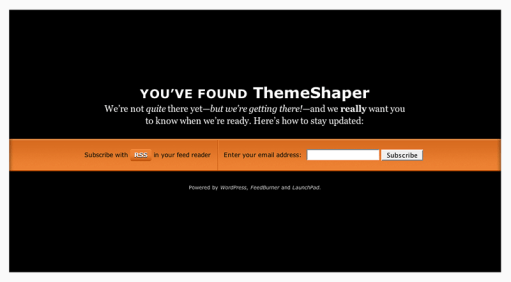
If you’re like me, you like registering domains. It’s exciting. But what’s not exciting is watching your hosting company or domain registrar turn your name into an ad-farm while you’re getting ready to launch your next WordPress blog. If you didn’t know it, that’s called domain parking; a way for hosts and domain registrars to capitalize on all the underdeveloped domains out there. That’s why I came up with LaunchPad, the WordPress Domain Parking Theme. To explain: if this theme had a motto it might be, “I’m not your billboard.”

Now with most hosts offering one-click installs of WordPress—I recommend Fused Network—it couldn’t be easier to park your domain in style while you get your future blog ready. Just install WordPress, sign up for FeedBurner with email subscriptions (see instructions below) and you’re set! You get a professionally designed domain parking page—for free—that serves up an RSS feed link and a form for email updates.

But why bother? Well, let’s see what web design expert Mr. Meltdown, of Design Meltdown, thinks of “coming soon” pages like LaunchPad.

This type of landing page has dropped the annoying construction cones and replaced with relevant and useful features. Namely among this is a sign up form to be notified of an actual launch, beta release, or other significant milestone. And of course this is a great way to build a nice mailing list of people to market a new product to. After all, if they actually complete the form they are likely to be very interested. Link.

Sounds like a good idea to me!

LaunchPad Features

  • Theme Options Page
  • Integration with FeedBurner
  • Professional design and typesetting
  • GPL Licensed—it’s free and you’re free to mess with it.

LaunchPad Instructions

Using LaunchPad is simple, it installs like any other WordPress theme, but there’s a couple of things you’ll need to get ready beforehand.

Get a FeedBurner ID and Feedmail

For a theme that incorporates FeedBurner to build subscriptions before you’ve even started blogging, this one is necessary. Signing up for FeedBurner is easy and you were probably going to do it anyway. Visit FeedBurner.com and follow the instructions there. Once that’s done, login and visit your account page.

At the end of the URL for your account page is a 7-digit string of numbers (see below). This is your FeedBurner ID number. It’s like the phone number for your RSS feed. Copy it and paste it somewhere handy, like an open text document. You’ll also need to copy your FeedBurner address. That’s the URL that serves up the RSS feed for your blog. Put that into your text document as well.

FeedBurner ID

While you’re here, sign up for Feedmail. Click the publicize tab and look for the Email Subscriptions link under services (as I write this, it’s the 4th item). Follow the setup instructions there—but don’t worry about pasting any code anywhere, LaunchPad does that all for you.

Credit has to go to Nathan Rice for showing me how to do this with his beautiful theme Elegant Blue. Thanks, Nathan!

Write your Welcome Post

When someone subscribes to your new blog with RSS they will be able to read any published posts. You don’t want them reading your “Hello World!” post. Write a simple introduction to your new blog that outlines it’s genesis and your goals so your new subscribers will have something to read.

Set Theme Options

Here’s where your Feeburner address and FeedBurner ID will go. Copy and paste the information from your text document (you did that, right?) into the appropriate fields.

LaunchPad Settings

… and You’re Done! You’re ready to launch your blog with LaunchPad!

Tips for Launching Your WordPress Blog with LaunchPad

There is really only one crucial tip for making the most of LaunchPad: let people know you have a URL. WordPress themes don’t work magic. You still have to market yourself. I recommend doing it in stages. First let your immediate friends and family know, then send out word on any social sites (like Facebook, LinkedIn, Hello Kitty Fan Club, etc.) you’re a member of. Follow that up with a link on an existing blog—if you have one. If you don’t have a blog I recommend getting one—using LaunchPad while you’re getting it ready of course!

Speaking of getting ready, make sure you read Collis Ta’eed’s two part Building a SuperBlog series on NorthXEast (Part two is here). It outlines the steps Collis took when launching FreelanceSwitch and his advice will help anyone launch their blog successfully. Without my LaunchPad theme, even. Imagine!

And while LaunchPad is collecting subscribers for you, create your own WordPress Theme with the help of the WordPress Theme Design Book.

Best of luck launching your blog! It can be a crazy time and I hope LaunchPad will help get rid of some of that craziness—and hopefully not cause any! Let me know how it goes in the comments section of this post or drop me a line at my contact page. Want to launch your next WordPress blog with a really great host? Try Fused Network.

View the live demo or download.

Translations

Ports

Bookmark the permalink. Post a comment or leave a trackback: Trackback URL.

89 Comments

  1. Posted January 24, 2008 at 4:34 pm | Permalink

    Very nice Ian!

  2. Ian Stewart
    Posted January 24, 2008 at 6:24 pm | Permalink

    Thanks, Will!

  3. Posted January 26, 2008 at 10:20 pm | Permalink

    This is neat, Ian. I’ll be trying it out soon…

    I would imagine it provides good motivation for pushing through a design as you see people signing up to be notified of its launch.

  4. Ian Stewart
    Posted January 26, 2008 at 10:33 pm | Permalink

    Can’t wait to see what you’re launching, David. And, yeah it is kind of motivating. Surprising too. I had more subscriptions by email than feed reader.

  5. Posted January 28, 2008 at 10:18 am | Permalink

    What an excellent idea! I’ll be using it for a planned local magazine type site. Thanks for thinking of this!

  6. Ian Stewart
    Posted January 28, 2008 at 10:47 am | Permalink

    You’re welcome, Sue.

  7. Posted January 29, 2008 at 4:33 am | Permalink

    If I was smart enough, I would’ve used such a theme before the launch of my Logo Design Love blog.

    Keep up the great work, Ian. ;)

  8. Ian Stewart
    Posted January 29, 2008 at 6:34 am | Permalink

    Thanks, David!

    (Oh, and make sure you check out David’s blog about logo design, everyone.)

  9. Posted January 29, 2008 at 11:41 am | Permalink

    Wow, that is such an obvious idea, I wish I had thought of this. I’m rolling this out onto several of my parked domains now.

  10. Ian Stewart
    Posted January 29, 2008 at 11:48 am | Permalink

    Cool. Glad you like it, Michael.

  11. Posted January 29, 2008 at 2:56 pm | Permalink

    Very cool idea…

  12. Ian Stewart
    Posted January 29, 2008 at 2:59 pm | Permalink

    Thanks, Tan.

  13. Posted January 30, 2008 at 1:04 am | Permalink

    No doubt its great. Thanks Ian!

  14. Posted February 4, 2008 at 3:41 am | Permalink

    simple yet effective it’s amazing how some theme’s just click, i know you can’t class this as a ‘theme’ but it does ‘exactly what it say’s on the tin’ :) Thanks!

  15. Ian Stewart
    Posted February 4, 2008 at 7:07 am | Permalink

    Thanks, Roger, I really—wait a minute, scuba-diving in Egypt (check out Roger’s blog)! That’s Harry Houdini stuff! I bet you don’t get bored much, Roger.

  16. Posted February 4, 2008 at 8:13 am | Permalink

    :) it’s amazing how the ‘timing’ of a sentence can make you chuckle, like your last one made me :) no no boredom here swapped selling software in London for diving in Egypt five years ago and have never looked back:)

    ps why don’t theme builder’s build into their theme’s simple option’s like the custom rss address and email that you have would make it easier for us non techie’s instead of digging into code we then break many times before we get it right!!

  17. Ian Stewart
    Posted February 4, 2008 at 9:52 am | Permalink

    “ps why don’t theme builder’s build into their theme’s simple option’s like the custom rss address and email that you have?”

    Mainly because it’s slightly confusing and not exactly easy. I barely understand it, myself and like I mentioned above, I only got it to work after following Nathan Rice’s example.

  18. Posted February 5, 2008 at 6:23 am | Permalink

    a clever theme!

    the funny thing when I (obviously scanning and not reading the details) checked the demo page, my initial thought was “what? So the demo section is not yet done, I guess I’ll check back later…”. Foolishly not knowing that that’s what exactly the theme’s purpose.

    Respect :)

  19. Ian Stewart
    Posted February 5, 2008 at 1:08 pm | Permalink

    Thanks, Hafiz. I just subscribed to your blog three days ago, by the way. Great stuff there.

  20. Posted February 5, 2008 at 8:33 pm | Permalink

    Awesome. Putting it to good use.

  21. Posted February 15, 2008 at 11:12 am | Permalink

    Thank you for this. One small issue - there seems to be some “mac trash” in your zip file. When I download it to a unix server and unzip the file, I get the launchpad folder, and an additional “__MACOSX” folder with ds_store files.

  22. Posted February 15, 2008 at 11:49 am | Permalink

    Thanks for the heads up, Michael. I’m looking into an alternate archiving utility that should remove that small issue.

  23. Posted February 17, 2008 at 4:45 am | Permalink

    Cheers for this brilliant idea Ian! Not only is my current site undergoing a redesign, but I have a few projects being worked on too, and yes, I’ll be implementing Launchpad for nearly all of them:)

    Thanks again for this.

  24. Posted February 17, 2008 at 9:43 pm | Permalink

    Glad you like it, Curvball!

  25. Posted February 19, 2008 at 9:54 am | Permalink

    Thanks. This just came right on time. :)

  26. Posted February 20, 2008 at 12:13 pm | Permalink

    Great tool. many thanks. I do have one question/ addition, though. Is there a way to further customize the email subscription screens for Feedburner? Now when you subscribe to my feed using Launchpad, I get the ugly blue/ standard message (and following confirmations from feed burner. Can I possibly change the text/ colors/ message of these? and how? it would be a great improvement to this great tool.

    Thanks again and keep them coming

  27. Posted February 20, 2008 at 1:15 pm | Permalink

    Ed, FeedBurner has some options for email styling under “email branding”. Look at the left sidebar under “email subscriptions” when you’re on the “email subscriptions” page.

  28. Posted February 20, 2008 at 1:42 pm | Permalink

    Thanks Ian, I already checked it out, and it works OK…. though not as slick as LaunchPad (sigh!)

  29. Posted February 24, 2008 at 2:55 am | Permalink

    Great idea

  30. Posted February 27, 2008 at 5:09 am | Permalink

    Lovely idea, lovely theme! Thanks!

  31. Posted March 14, 2008 at 10:21 am | Permalink

    Any other theme like this then? Beautiful - Simple and Elegant!!!

  32. Posted March 26, 2008 at 10:17 am | Permalink

    Thank you for the nice Theme! Very good to get started.

  33. joe
    Posted March 27, 2008 at 11:55 am | Permalink

    So i have set up launchpad on my domain and set up feedburner, well i think i have correctly.

    But with my feed its the generic feeburner welcome post. How do i start writing feeds from wordpress to automatically update feedburner.

    Im stuck and yes im new to all this any help would be appriciated

  34. Posted March 27, 2008 at 12:45 pm | Permalink

    It takes a while before FeedBurner updates. As long as you followed the instructions in the post you should be fine, Joe.

  35. joe
    Posted March 28, 2008 at 5:05 am | Permalink

    Me again, so i’m checking feedburner and the original feed is coming from wordpress http://www.mywebsite.co.uk/wp-rss2.php and when i go into my main account at feedburner and view my rss feed is shows correctly the feed from wordpress but when i actually go to my website and view the feed from the button on the parking page it still shows as the feedburner default welcome messgage?

    Will this change in time or if there something i may be missing? I am concerned as i have already started getting subcribers even before i started writing my feeds so i want people who click the rss feed button to start seeing my posts from wordpress with the updates on how the website is going, thanks.

  36. joe
    Posted March 28, 2008 at 5:09 am | Permalink

    scratch my last comment, i finally found out what i was doing wrong, i was giving it the wrong feedburner address in my settings, i feel so stupid thanks for your help especially Ian thanks for a quick reply :)

  37. Posted March 28, 2008 at 5:10 am | Permalink

    @ Joe: people will be able to read your posts via their feedreader. Not via the WordPress blog using the Launchpad theme. As soon as your definite theme is up, people will be able to view your posts just like on any other blog. For instance mine :)

  38. Posted March 28, 2008 at 5:34 am | Permalink

    *lol* .. scratch mine too then ;)

  39. Posted March 28, 2008 at 6:09 am | Permalink

    Post-scratch-fever!

  40. Posted April 2, 2008 at 7:04 pm | Permalink

    I thought you might like to see how I’ve used your theme. I’ve recently moved my blog to a new home and I’ve used your theme to handle the re-direct.

    http://blog.yourwish.co.nz/

    After a little customisation, it works perfectly! Thanks

  41. Posted April 2, 2008 at 8:05 pm | Permalink

    Very nice update, Dawn. Thanks for letting me know about it.

  42. Posted April 3, 2008 at 9:58 am | Permalink

    Errr, derrrrrrrrrrr, how are we sposed to download it ?

  43. Posted April 3, 2008 at 10:06 am | Permalink

    I’ve highlighted the download link.

  44. Posted April 9, 2008 at 11:10 am | Permalink

    Thanks for the great theme! Just what I need while I wait to relaunch my site!

  45. Posted April 9, 2008 at 1:28 pm | Permalink

    You’re welcome, Tommy.

  46. Posted April 11, 2008 at 8:33 am | Permalink

    Here’s a good alternative if you don’t want to use WP:
    http://LaunchSoon.com

    You can also check out some cool designs from the gallery: http://launchsoon.com/gallery.php

  47. Posted May 10, 2008 at 5:20 pm | Permalink

    Thanks

  48. Posted May 15, 2008 at 3:50 am | Permalink

    Cool template found….
    i will definitely try this latter on…

    thanks for sharing

  49. Posted May 18, 2008 at 6:00 am | Permalink

    It’s cool!

    Thanks 4 theme, I like it very much!

  50. Posted June 13, 2008 at 9:57 am | Permalink

    Great theme. However, Feedburner seems to have an issue with validation. (my host is in germany). Anybody else have that issue? Cant generate the feed with out validation.
    “It looks like this is a web page, not a feed. I looked for a feed associated with this page, but couldn’t find one. Please enter the address of your feed to validate.” Thanks

  51. Posted June 13, 2008 at 10:39 am | Permalink

    Weird. I’d check the Feedburner Forums. If it turns out to be some weird problem with LaunchPad, let me know.

  52. Posted June 23, 2008 at 4:36 pm | Permalink

    Seems like a nice idea leading to not so boring pages with eventual benefits for the users on both ends.

  53. Posted June 24, 2008 at 12:29 am | Permalink

    Nice Theme, I like it very much. I will definitely try it. Thanks

  54. Posted July 3, 2008 at 3:19 pm | Permalink

    Thanks so much for this! My newest website bookwormsunite isn’t ready for viewers but I didn’t like the domain parking that my registrar had so I used LaunchPad and now I have a couple of subscribers who are waiting to see what I have in store!

  55. Posted July 3, 2008 at 3:24 pm | Permalink

    You’re welcome. Also, I’ve subscribed to bookwormsunite.com. The title caught my interest.

  56. Posted July 14, 2008 at 8:07 am | Permalink

    Awesome theme - comes in handy, big time. It’s the first thing I put up when I’m working on a client’s site. (And then I use ‘Theme Test Drive’ to work on their custom theme behind the scenes…)

    A heads up for anyone who does the same - if Theme Test Drive is enabled, you no longer see the Theme Options screen where you enter the Feedburner info… so do that first, and then enable the Test Drive. Hopefully that’ll save you the frantic searching I went through!

    Thanks again, Ian - really useful contribution you’ve created here.

  57. Posted July 14, 2008 at 5:54 pm | Permalink

    Thanks for the tip about Theme Test Drive. That’s a really great idea.

  58. Posted July 15, 2008 at 1:22 am | Permalink

    If you send me the few lines of text, I’ll give you the translations for a German version if you are interested, just email me.

  59. Posted July 22, 2008 at 2:58 pm | Permalink

    I love the idea and am trying to implement this on my site. Im a newbie when it comes to web design, but am slowly teaching myself drupal. I do have one problem though. I signed up for a feedburner account but cant seem to find my account number. When I view my account info i get this:

    https://www.feedburner.com/fb/a/account;jsessionid=4C7E14D8D6D2ED87F158FB20C5EC1047.fb1

    Any help would be appreicated. Thanks!

  60. Posted July 22, 2008 at 3:04 pm | Permalink

    @Kyle: Make sure you’re looking at the FeedBurner dashboard. Take a look at the URL again in the post above.

  61. Posted July 22, 2008 at 8:45 pm | Permalink

    I feel bad posting questions like this in your comments section but I am guessing you have to purchase a pro account to get to the dashboard? I searched all around “My Feeds” and ” My Account” and cant find anything. I tired manually typing in the url to get close to it, but it just redirects me to the “My Feeds” page.

  62. Posted July 22, 2008 at 9:11 pm | Permalink

    @Kyle: If you’re on the page that has the tabs; Analyze, Optimize, Publicize, etc., you’re on the right page. Look at the address bar and you’ll see it.

    And the pro features are free. Good luck.

  63. Posted July 23, 2008 at 10:16 am | Permalink

    Me again. Taken some time, but I have my feedburner account working recieving requests. (I hadnt subscribed in my last problem) My new problem is that I am using drupal and not wordpress. I downloaded your theme from drupals theme section but I am guessing that the zip does not contain all the files needed for the theme. When I activate the theme and set my site to “Offline Mode” all I get is text and the subscription box. No color or styleing. I tried using the images folder from the theme for Wordpress but I am guessing it does not contain what the drupal theme is needing. Feel free to look at my site to get an idea of what is happening. http://www.thefrantzs.com/

    Thanks again!!

  64. Posted July 24, 2008 at 5:00 am | Permalink

    @Kyle: Can’t help you with the Drupal version, Kyle. I didn’t code it up and I’m not the maintainer. Check the contact info on the release page.

  65. Posted August 5, 2008 at 9:03 am | Permalink

    I can’t wait to use this for my new start up!thanks a million!

  66. Posted August 16, 2008 at 1:43 am | Permalink

    Ian thanks for the fantastic parking theme. This is to be my first blog ever and your theme gives me a little more breathing room to obsess on making my content perfect before actually launching. And if you knew what a tech retard I am you would be amazed that I loaded up your theme all by myself and activated Feedburner right afterwards — -via your instructions!

    Thank you again!
    Best, Derrick:0

  67. Posted August 17, 2008 at 7:59 pm | Permalink

    Hi,

    One more. We used LaunchPad for Mayomi.com private beta. Great design. Why going for other design when you have the best one :-)

    Keep Going,

    John :-)

  68. Posted August 20, 2008 at 3:16 pm | Permalink

    Ian,
    This is an awesome theme, great work my friend. I changed the design up a bit and added a twitter feed to the page. Check it out here http://radiumlabs.com
    This will work great while I complete my new site.

  69. Posted September 7, 2008 at 10:30 pm | Permalink

    thank you, thank you, thank you.

    it’s a lovely design. I just decided to make it more personal and match my future site.

    thanks for making it easy to do that!

  70. Kevin
    Posted September 15, 2008 at 8:08 pm | Permalink

    For some reason the theme does not utilize the scroll bars in Firefox, but works fine in IE7? have you seen this??

  71. Posted September 18, 2008 at 10:37 pm | Permalink

    Great theme, I already started using it for my latest website: tyrojobs.com

  72. Posted September 22, 2008 at 5:11 pm | Permalink

    This is so great! I really appreciate the how-to in addition to the theme, as I’m new to Wordpress and managing my own feed. While I’m excited to get my blog up and running, at least I can stop waiting to give out the address! Many thanks.

  73. Posted October 6, 2008 at 9:35 am | Permalink

    Great idea, exactly what I have been looking for. I have purchased quite a few domains recently so am going to use your theme until I finally get round to developing each one. Thanks

  74. jason jones
    Posted October 10, 2008 at 1:22 am | Permalink

    Has Feedburner changed since this theme was created? I can’t seem to locate the “account id” referred to, nor can i find any reference to a service called “feedmail”

  75. jason jones
    Posted October 10, 2008 at 2:25 am | Permalink

    Got it - the directions on how to use the feed burner site are vague… Basically for those who run into the same issue: You need to point Feed Burner to your Wordpress blog feed. IE: http://www.yoursite.com/wp-rss2.php

    So when you first setup your Feed Burner account you will see a box to “burn your feed”. Then press “next”.

    Once you go through that process you will arrive at a page which will show your ID just like the instructions above state.

    Good Luck

  76. Posted October 13, 2008 at 12:54 am | Permalink

    Great theme. Though I cannot seem to find the settings to add my feedburner info. Looked everywhere in the wp backend. I do have the them activated too. Ideas Anyone?

  77. Posted October 13, 2008 at 4:24 pm | Permalink

    If you are not finding the settings to add your feedburner info it is under “design > current theme options”
    - Thanks Ian!

  78. Posted October 15, 2008 at 2:59 pm | Permalink

    Just wanted to say this is an awesome idea and wonderful template. Good job. Keep up the good work!

  79. Posted October 16, 2008 at 9:26 am | Permalink

    Hi, I love this theme :)

    I have installed this on my new site http://www.matthewbibby.com and it is working great!

    One question, what is the easiest way to develop the new site while LaunchPad is the theme?

    Great work!

  80. Posted October 20, 2008 at 1:07 am | Permalink

    If you’re like me, you like registering domains. It’s exciting. But what’s not exciting is watching your hosting company or domain registrar turn your name into an ad-farm while you’re getting ready to launch your next Word Press blog. If you didn’t know it, that’s called domain parking; a way for hosts and domain registrars to capitalize on all the underdeveloped domains out there. That’s why I came up with Launch Pad, the Word Press Domain Parking Theme. To explain: if this theme had a motto it might be, “I’m not your billboard.”
    ________________
    mikemathew
    Link Building

  81. Posted October 31, 2008 at 11:28 am | Permalink

    je te remercie pour cette iage :D

  82. Steve
    Posted November 2, 2008 at 9:43 am | Permalink

    Very nice, works well, easy to set up. Thanks a lot!

  83. Posted November 11, 2008 at 1:02 pm | Permalink

    How do I tweak the theme that I will eventually use while having LaunchPad on the landing page? How can I mess with my eventual site if Launchpad is the only page displayed?

  84. Posted December 2, 2008 at 1:43 am | Permalink

    What a timely discovery for me. I’ve schedule a luanch of a new blog in January. I’ve just set up LaunchPad as my theme and have activated the RRS feed and Email Subscriptions from Feedburner. I’m quickly up and running. THAKKS TO YOUR EXTRAORDINARY LAUNCHPAD.

    While at your site, I’ve poked around. I’m also extremely intrigued by the Acarnas Theme. I’ll be considering a purchase as I start to develop my content. Curiously, I’m looking for a theme that is elegant, while also also some commerciality. Acarnas may be the ticket.

  85. Posted December 6, 2008 at 4:03 pm | Permalink

    Really nice! I use it at magnumcanvas.com
    Thank You!! Björn

  86. Posted December 8, 2008 at 3:36 pm | Permalink

    I’ve been hunting all over for a decent parking solution and this is exactly what I’ve been looking for. I’ve got a ton of staged domains that are probably making my registrar a small fortune. Thanks for putting this together.

  87. Posted December 9, 2008 at 10:24 pm | Permalink

    This is perfect. Thank you!

  88. Posted December 17, 2008 at 8:36 am | Permalink

    Nice Theme

  89. Estan
    Posted December 26, 2008 at 6:10 am | Permalink

    Hello Ian. is there any way I can integrate the audio player of wpaudioplayer.com into the theme? I like my readers to listen to music while my blog runs with launchpad theme.

    The plugin author included a standalone player for index pages and parked domain pages here: http://wpaudioplayer.com/standalone

    but I do not know how to integrate them.

76 Trackbacks

  1. By WPDesigner » LaunchPad WordPress Theme on January 29, 2008 at 2:59 am

    […] Ian Stewart, LaunchPad is a unique theme originally built for domain parking or blogs not yet ready to for their […]

  2. […] ha gustado mucho el theme LaunchPad para WordPress. Se trata de un theme pensado para los blogs que todavía no están listos para ser […]

  3. […] LaunchPad, The WordPress Domain Parking Theme (tags: wp wordpress wpthemes) […]

  4. By LaunchPad Theme for WordPress on January 29, 2008 at 9:26 pm

    […] | DEMO | AUTHOR Rate it:  Loading […]

  5. By Skylog » Blog Archive » links for 2008-01-30 on January 30, 2008 at 12:18 am

    […] LaunchPad, The WordPress Domain Parking Theme (tags: wordpress theme) […]

  6. […] Stewart, acaba de lanzar LaunchPad un theme Wordpress muy original pensado para aquellos blog que todavía no están listos para ser […]

  7. […] blogs han comentado este interesante tema llamado LaunchPad. No es un tema propiamente dicho, pues no está pensado para publicar, si no para preparan una […]

  8. […] LaunchPad | Vía: […]

  9. […] LaunchPad è un tema per WordPress pensato per i blog no ancora pronti per essere lanciati che di solito mostrano la classica scritta “sito web in costruzione“. […]

  10. […] aparición de tu blog. Aquí puedes ver una alternativa bastante interesante, cuyo nombre es LaunchPad, diseñado por Ian Stewart de […]

  11. By WPCandy » WordPress Themes for 02/04 on February 4, 2008 at 5:01 am

    […] Source: http://themeshaper.com/wordpress-domain-parking-theme/ […]

  12. By Quick n’ Dirty Offline Status on February 4, 2008 at 1:24 pm

    […] sure you’ve seen by now the excellent pre-launch theme called LaunchPad by Ian Stewart. This has inspired me to focus my last plugin on what to do if you want to turn your […]

  13. By LaunchPad WordPress Theme | Blog Themes Plus on February 5, 2008 at 10:08 pm

    […] Release Page […]

  14. […] I own lots of domains.  Many are parked using special software that puts up an adsense focused page on the domain, in anticipation for either sale of the domain or development.  Using the parking tools I do are probably way over the top for the majority of users and can also be quite pricey.    So if you’re about to launch a blog, but not quite up to the launch bit then I have a great theme for you - LaunchPad […]

  15. […] URI: LaunchPad Author: Ian Stewart Description: LaunchPad WordPress Theme is a Domain Parking Theme. It all […]

  16. […] “Coming Soon” and “Under Construction” pages have been considered web design faux pas simply because there is no excuse for an empty website. You can install WordPress in five minutes, for crying out loud! Keep your web host or domain registrar from making money off a website or domain you already paid for with LaunchPad. […]

  17. […] | Release Page | […]

  18. By links for 2008-02-15 on February 14, 2008 at 7:20 pm

    […] LaunchPad, The WordPress Domain Parking Theme I came up with LaunchPad, the WordPress Domain Parking Theme. To explain: if this theme had a motto it might be, “I’m not your billboard.” (tags: wordpress themes domain) […]

  19. By LaunchPad, The WordPress Domain Parking Theme on February 15, 2008 at 1:27 am

    […] LaunchPad, The WordPress Domain Parking Theme That’s why I came up with LaunchPad, the WordPress Domain Parking Theme. To explain: if this theme had a motto it might be, “I’m not your billboard.” No Comments, Comment or Ping […]

  20. By BlogBuzz February 16, 2008 » Webmaster-Source on February 16, 2008 at 4:12 am

    […] on a new blog? Take a look at LaunchPad, the WordPress Domain Parking Theme. It tells your readers that the site will be coming in the near future, and allows them to […]

  21. […] solução elegante que encontrei é usar um tema do Wordpress. O tema chamado LauchPad foi feito justamente pra […]

  22. […] your own domain? But not ready to start your blog? Use LaunchPad, the WordPress Domain Parking Theme. This simple theme will help you to display a customized […]

  23. By Parking WordPress | Tree Rat Fishing on February 18, 2008 at 11:29 am

    […] the LaunchPad theme for WordPress by ThemeShaper.   With this theme you are able to turn a useless […]

  24. […] şuradan görülebilir ve […]

  25. By SEO for WordPress blogs - tips and tricks | eydryan on February 19, 2008 at 2:10 am

    […] make under construction pages. the only exception to this rule is to use http://themeshaper.com/wordpress-domain-parking-theme/ and park it while you write your first 2-3 posts to get your blog […]

  26. […] şuradan görülebilir ve […]

  27. […] Get LaunchPad » […]

  28. By Extraface on February 27, 2008 at 8:28 pm

    The LaunchPad WordPress Theme As A Hipster Domain Holding Page…

    I haven’t made much progress in deciding on what to use as a hipster domain holding page system since I last wrote on the subject. In short, that’s some kind of page to use as a placeholder on all of those oh-so-clever URLs you’re sto…

  29. By Launch Your Blog With LaunchPad on February 28, 2008 at 10:53 am

    […] good response. Many of the comments actually pointed me to an existing WordPress theme known as LaunchPad, which the author advertises as a parked […]

  30. By Morphing WordPress | RiteTurnOnly.com on March 2, 2008 at 11:33 pm

    […] is a rather unique theme created by Ian Stewart of ThemeShaper called LauchPad. The idea is simple. You have just registered a new domain but you’re not quite ready to set […]

  31. […] WordPress blog and still dont want to loose your traffic / visitors then LaunchPad is just for you. LaunchPad is the only professional Domain Parking WordPress theme (So far) that will fulfill your wants of […]

  32. […] oplossing bestaat uit twee stappen die ik met je zal doorlopen. Als eerste download je het Launchpad Theme van Themeshaper. Deze theme ga je uploaden naar de betreffende themes map in je WordPress installatie met je […]

  33. […] | Release Page | Download March 23rd, […]

  34. By Outstanding Free and Premium WordPress Themes on March 24, 2008 at 6:36 am

    […] LaunchPad Domain Parking Theme- An easy way to park your site while it’s still underdeveloped. The main feature is to allow visitors subscribe through RSS and e-mail. […]

  35. By 45 WordPress themes » Ricotero's Blog on March 24, 2008 at 1:49 pm

    […] LaunchPad Domain Parking Theme- An easy way to park your site while it’s still underdeveloped. The main feature is to allow visitors subscribe through RSS and e-mail. […]

  36. […] moins terminé, il fallait alors faire le passage de version ici. J’ai donc mis en place le Launchpad qui est une sorte de thème “de maintenance” très réussit puisqu’il permet une […]

  37. […] [more][live demo][download] […]

  38. […] LaunchPad, The WordPress Domain Parking Theme […]

  39. […] domain anda daripada menjadi Domain Parking kepada suatu laman yang berguna dengan menggunakan tema LaunchPad yang perlu digunakan bersama WordPress. Untuk memasang WordPress, anda boleh login ke cPanel dan […]

  40. By Best Wordpress Themes » LaunchPad on May 5, 2008 at 4:13 pm

    […] Demo Full details and download […]

  41. […] WP per a aplicacions ‘en construcció’ http://themeshaper.com/wordpress-domain-parking-theme/ […]

  42. […] LaunchPad, The WordPress Domain Parking Theme here Related UpdatesWordPress Ping ListBest Open Source Social Networking CMS AwardDisqus Comment Forums […]

  43. […] Launchpad Wordpress theme: Demo - Download […]

  44. […] Suppose you see some big shopping mall near your locality, you will not see it directly built and opened, there will be boards and advertisements already before it is built, and these boards show “Opening shortly - A great shoppi…”, this actually gets some good talks and people already talk about it and keep in mind to give a visit there in future when it is built. The same is with some big companies which try to launch their online ventures. First they keep the site under construction and prefer to show the visitors how good the launch is going to be. Its now easy for the company blogs, when you will see this theme called the LaunchPad wordpress theme. […]

  45. By LaunchPad — Simple Themes on May 23, 2008 at 3:29 pm

    […] Demo […]

  46. By