
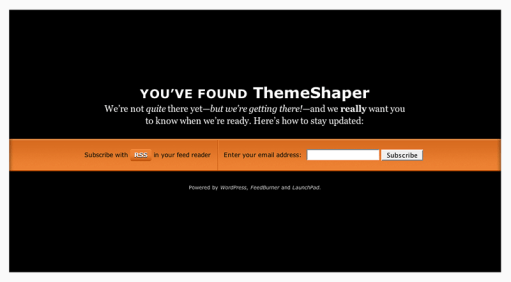
If you’re like me, you like registering domains. It’s exciting. But what’s not exciting is watching your hosting company or domain registrar turn your name into an ad-farm while you’re getting ready to launch your next WordPress blog. If you didn’t know it, that’s called domain parking; a way for hosts and domain registrars to capitalize on all the underdeveloped domains out there. That’s why I came up with LaunchPad, the WordPress Domain Parking Theme. To explain: if this theme had a motto it might be, “I’m not your billboard.”
Now with most hosts offering one-click installs of WordPress it couldn’t be easier to park your domain in style while you get your future blog ready. Just install WordPress, sign up for FeedBurner with email subscriptions (see instructions below) and you’re set! You get a professionally designed domain parking page—for free—that serves up an RSS feed link and a form for email updates.
But why bother? Well, let’s see what web design expert Mr. Meltdown, of Design Meltdown, thinks of “coming soon” pages like LaunchPad.
This type of landing page has dropped the annoying construction cones and replaced with relevant and useful features. Namely among this is a sign up form to be notified of an actual launch, beta release, or other significant milestone. And of course this is a great way to build a nice mailing list of people to market a new product to. After all, if they actually complete the form they are likely to be very interested. Link.
Sounds like a good idea to me!
LaunchPad Features
- Theme Options Page
- Integration with FeedBurner
- Professional design and typesetting
- GPL Licensed—it’s free and you’re free to mess with it.
LaunchPad Instructions
Using LaunchPad is simple, it installs like any other WordPress theme, but there’s a couple of things you’ll need to get ready beforehand.
Get a FeedBurner ID and Feedmail
For a theme that incorporates FeedBurner to build subscriptions before you’ve even started blogging, this one is necessary. Signing up for FeedBurner is easy and you were probably going to do it anyway. Visit FeedBurner.com and follow the instructions there. Once that’s done, login and visit your account page.
All you’ll need is the name of your FeedBurner feed address. That’s the text after “http://feeds2.feedburner.com/”. Copy it into a text file somewhere for easy reference.
While you’re here, sign up for Feedmail. Click the publicize tab and look for the Email Subscriptions link under services (as I write this, it’s the 4th item). Follow the setup instructions there—but don’t worry about pasting any code anywhere, LaunchPad does that all for you.
Credit has to go to Nathan Rice for showing me how to do this with his beautiful theme Elegant Blue. Thanks, Nathan!
Write your Welcome Post
When someone subscribes to your new blog with RSS they will be able to read any published posts. You don’t want them reading your “Hello World!” post. Write a simple introduction to your new blog that outlines it’s genesis and your goals so your new subscribers will have something to read.
Set Theme Options
Simply copy your feed name into the options page …
… and You’re Done! You’re ready to launch your blog with LaunchPad!
Tips for Launching Your WordPress Blog with LaunchPad
There is really only one crucial tip for making the most of LaunchPad: let people know you have a URL. WordPress themes don’t work magic. You still have to market yourself. I recommend doing it in stages. First let your immediate friends and family know, then send out word on any social sites (like Facebook, LinkedIn, Hello Kitty Fan Club, etc.) you’re a member of. Follow that up with a link on an existing blog—if you have one. If you don’t have a blog I recommend getting one—using LaunchPad while you’re getting it ready of course!
Speaking of getting ready, make sure you read Collis Ta’eed’s two part Building a SuperBlog series on NorthXEast (Part two is here). It outlines the steps Collis took when launching FreelanceSwitch and his advice will help anyone launch their blog successfully. Without my LaunchPad theme, even. Imagine!
View the live demo or download.
 ThemeShaper
341 responses
[…] | Release Page | […]
[…] | Release page Not Rated! Loading … Lasa un […]
[…] Launchpad here. Or view the live demo here. addthis_url = […]
[…] Download Link […]
[…] | Release Page | […]
Seems like a nice idea leading to not so boring pages with eventual benefits for the users on both ends.
Nice Theme, I like it very much. I will definitely try it.
Thanks
Thanks so much for this! My newest website bookwormsunite isn’t ready for viewers but I didn’t like the domain parking that my registrar had so I used LaunchPad and now I have a couple of subscribers who are waiting to see what I have in store!
You’re welcome. Also, I’ve subscribed to bookwormsunite.com. The title caught my interest.
[…] it and people were asking when it would be officially launched and if I could do it sooner. (I had Launchpad installed so they couldn’t comment/discuss any posts […]
[…] but aren’t ready to launch, you *can* use WordPress to announce to the world just that. The LaunchPad theme’s landing page gives users the chance to sign-up for the RSS feed and announcements […]
Awesome theme – comes in handy, big time. It’s the first thing I put up when I’m working on a client’s site. (And then I use ‘Theme Test Drive’ to work on their custom theme behind the scenes…)
A heads up for anyone who does the same – if Theme Test Drive is enabled, you no longer see the Theme Options screen where you enter the Feedburner info… so do that first, and then enable the Test Drive. Hopefully that’ll save you the frantic searching I went through!
Thanks again, Ian – really useful contribution you’ve created here.
Thanks for the tip about Theme Test Drive. That’s a really great idea.
[…] LaunchPad, The WordPress Domain Parking Theme – cool theme for parked domains […]
If you send me the few lines of text, I’ll give you the translations for a German version if you are interested, just email me.
[…] şi configurezi chiar tot ceea ce îţi doreai? Nicio problemă, folosind o temă gratuită numită Launchpad poţi face un pic de buzz despre viitorul tău domeniu, poţi oferi posibilitatea de abonare la […]
[…] Upload the Launchpad theme. […]
[…] LaunchePad- Small Potato was brillant in designing this. It’s great for new blogs waiting to open or even you’re going on hiatus to do a redesign. LaunchPad can be discovered or downloaded here. […]
I love the idea and am trying to implement this on my site. Im a newbie when it comes to web design, but am slowly teaching myself drupal. I do have one problem though. I signed up for a feedburner account but cant seem to find my account number. When I view my account info i get this:
https://www.feedburner.com/fb/a/account;jsessionid=4C7E14D8D6D2ED87F158FB20C5EC1047.fb1
Any help would be appreicated. Thanks!
@Kyle: Make sure you’re looking at the FeedBurner dashboard. Take a look at the URL again in the post above.
I feel bad posting questions like this in your comments section but I am guessing you have to purchase a pro account to get to the dashboard? I searched all around “My Feeds” and ” My Account” and cant find anything. I tired manually typing in the url to get close to it, but it just redirects me to the “My Feeds” page.
@Kyle: If you’re on the page that has the tabs; Analyze, Optimize, Publicize, etc., you’re on the right page. Look at the address bar and you’ll see it.
And the pro features are free. Good luck.
Me again. Taken some time, but I have my feedburner account working recieving requests. (I hadnt subscribed in my last problem) My new problem is that I am using drupal and not wordpress. I downloaded your theme from drupals theme section but I am guessing that the zip does not contain all the files needed for the theme. When I activate the theme and set my site to “Offline Mode” all I get is text and the subscription box. No color or styleing. I tried using the images folder from the theme for WordPress but I am guessing it does not contain what the drupal theme is needing. Feel free to look at my site to get an idea of what is happening. http://www.thefrantzs.com/
Thanks again!!
@Kyle: Can’t help you with the Drupal version, Kyle. I didn’t code it up and I’m not the maintainer. Check the contact info on the release page.
[…] – some excellent stuff, including LaunchPad, a domain parking theme that looks better “parked” than many sites look (some of mine, […]
[…] Room est un peu comme LaunchPad, c’est un thème que j’ai découvert hier sur Chergaoui.com (qui vient de changer de […]
I can’t wait to use this for my new start up!thanks a million!
[…] blog software), and usually no more than ten dollars. If using a WordPress, you can use the LaunchPad Theme designed by Ian Stewart, which gives you a good starting point and domain parking theme before you […]
Ian thanks for the fantastic parking theme. This is to be my first blog ever and your theme gives me a little more breathing room to obsess on making my content perfect before actually launching. And if you knew what a tech retard I am you would be amazed that I loaded up your theme all by myself and activated Feedburner right afterwards—via your instructions!
Thank you again!
Best,
Derrick:0
Hi,
One more. We used LaunchPad for Mayomi.com private beta. Great design. Why going for other design when you have the best one 🙂
Keep Going,
John 🙂
Ian,
This is an awesome theme, great work my friend. I changed the design up a bit and added a twitter feed to the page. Check it out here http://radiumlabs.com
This will work great while I complete my new site.
[…] Splash vous fourni une page dans le style de Launchpad (thème site en travaux pour wordpress), il s’agit en fait d’une sorte de générateur […]
[…] теми: LaunchPad URI теми: https://themeshaper.com/wordpress-domain-parking-theme/ Опис: Стильно припаркуй свій домен з WordPress та FeedBurner. […]
[…] Launchpad est un thème de parcage de domaines, utilisant astucieusement certaines fonctions de FeedBurner, créé par Ian Stewart en janvier 2008. Extrait de son fichier “readme.txt”: Si vous êtes comme moi, vous aimez enregistrer des noms de domaine. C’est excitant. Mais ce qui n’est pas excitant c’est de voir votre hébergeur ou registrar transformer vos domaines en des pages publicitaires pendant que vous vous préparez à lancer votre prochain blog WordPress. Si vous ne le saviez pas, c’est ce qu’on appelle du parcage de domaines; un moyen pour les hébergeurs et les registrars de capitaliser sur tous les domaines non encore développés. C’est pourquoi j’ai crée LaunchPad, le Thème WordPress de Parquage de Domaine. Plus simplement dit, si ce thème devait avoir une devise ce pourrait être “je ne suis pas votre affiche publicitaire”. […]
thank you, thank you, thank you.
it’s a lovely design. I just decided to make it more personal and match my future site.
thanks for making it easy to do that!
For some reason the theme does not utilize the scroll bars in Firefox, but works fine in IE7? have you seen this??
[…] LaunchPad est un thème de parcage de domaines, utilisant astucieusement certaines fonctions de FeedBurner, créé par Ian Stewart en janvier 2008. Extrait de son fichier “readme.txt”: Si vous êtes comme moi, vous aimez enregistrer des noms de domaine. C’est excitant. Mais ce qui n’est pas excitant c’est de voir votre hébergeur ou registrar transformer vos domaines en des pages publicitaires pendant que vous vous préparez à lancer votre prochain blog WordPress. Si vous ne le saviez pas, c’est ce qu’on appelle du parcage de domaines; un moyen pour les hébergeurs et les registrars de capitaliser sur tous les domaines non encore développés. C’est pourquoi j’ai crée LaunchPad, le Thème WordPress de Parquage de Domaine. Plus simplement dit, si ce thème devait avoir une devise ce pourrait être “je ne suis pas votre affiche publicitaire”. […]
Great theme, I already started using it for my latest website: tyrojobs.com
[…] LaunchPad Domain Parking Theme- An easy way to park your site while it’s still underdeveloped. The main feature is to allow visitors subscribe through RSS and e-mail. […]
This is so great! I really appreciate the how-to in addition to the theme, as I’m new to WordPress and managing my own feed. While I’m excited to get my blog up and running, at least I can stop waiting to give out the address! Many thanks.
Great idea, exactly what I have been looking for. I have purchased quite a few domains recently so am going to use your theme until I finally get round to developing each one. Thanks
Has Feedburner changed since this theme was created? I can’t seem to locate the “account id” referred to, nor can i find any reference to a service called “feedmail”
Got it – the directions on how to use the feed burner site are vague… Basically for those who run into the same issue: You need to point Feed Burner to your WordPress blog feed. IE: http://www.yoursite.com/wp-rss2.php
So when you first setup your Feed Burner account you will see a box to “burn your feed”. Then press “next”.
Once you go through that process you will arrive at a page which will show your ID just like the instructions above state.
Good Luck
Great theme. Though I cannot seem to find the settings to add my feedburner info. Looked everywhere in the wp backend. I do have the them activated too. Ideas Anyone?
If you are not finding the settings to add your feedburner info it is under “design > current theme options”
– Thanks Ian!
[…] LaunchPad Domain Parking Theme- An easy way to park your site while it’s still underdeveloped. The main feature is to allow visitors subscribe through RSS and e-mail. […]
Just wanted to say this is an awesome idea and wonderful template. Good job. Keep up the good work!
Hi, I love this theme 🙂
I have installed this on my new site http://www.matthewbibby.com and it is working great!
One question, what is the easiest way to develop the new site while LaunchPad is the theme?
Great work!
If you’re like me, you like registering domains. It’s exciting. But what’s not exciting is watching your hosting company or domain registrar turn your name into an ad-farm while you’re getting ready to launch your next Word Press blog. If you didn’t know it, that’s called domain parking; a way for hosts and domain registrars to capitalize on all the underdeveloped domains out there. That’s why I came up with Launch Pad, the Word Press Domain Parking Theme. To explain: if this theme had a motto it might be, “I’m not your billboard.”
________________
mikemathew
Link Building
je te remercie pour cette iage 😀