
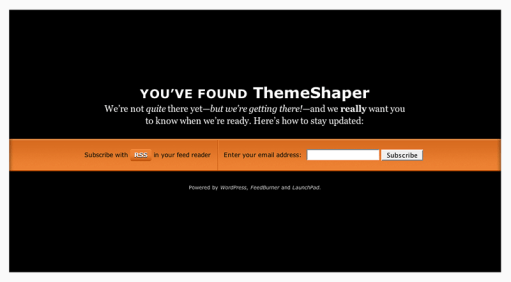
If you’re like me, you like registering domains. It’s exciting. But what’s not exciting is watching your hosting company or domain registrar turn your name into an ad-farm while you’re getting ready to launch your next WordPress blog. If you didn’t know it, that’s called domain parking; a way for hosts and domain registrars to capitalize on all the underdeveloped domains out there. That’s why I came up with LaunchPad, the WordPress Domain Parking Theme. To explain: if this theme had a motto it might be, “I’m not your billboard.”
Now with most hosts offering one-click installs of WordPress it couldn’t be easier to park your domain in style while you get your future blog ready. Just install WordPress, sign up for FeedBurner with email subscriptions (see instructions below) and you’re set! You get a professionally designed domain parking page—for free—that serves up an RSS feed link and a form for email updates.
But why bother? Well, let’s see what web design expert Mr. Meltdown, of Design Meltdown, thinks of “coming soon” pages like LaunchPad.
This type of landing page has dropped the annoying construction cones and replaced with relevant and useful features. Namely among this is a sign up form to be notified of an actual launch, beta release, or other significant milestone. And of course this is a great way to build a nice mailing list of people to market a new product to. After all, if they actually complete the form they are likely to be very interested. Link.
Sounds like a good idea to me!
LaunchPad Features
- Theme Options Page
- Integration with FeedBurner
- Professional design and typesetting
- GPL Licensed—it’s free and you’re free to mess with it.
LaunchPad Instructions
Using LaunchPad is simple, it installs like any other WordPress theme, but there’s a couple of things you’ll need to get ready beforehand.
Get a FeedBurner ID and Feedmail
For a theme that incorporates FeedBurner to build subscriptions before you’ve even started blogging, this one is necessary. Signing up for FeedBurner is easy and you were probably going to do it anyway. Visit FeedBurner.com and follow the instructions there. Once that’s done, login and visit your account page.
All you’ll need is the name of your FeedBurner feed address. That’s the text after “http://feeds2.feedburner.com/”. Copy it into a text file somewhere for easy reference.
While you’re here, sign up for Feedmail. Click the publicize tab and look for the Email Subscriptions link under services (as I write this, it’s the 4th item). Follow the setup instructions there—but don’t worry about pasting any code anywhere, LaunchPad does that all for you.
Credit has to go to Nathan Rice for showing me how to do this with his beautiful theme Elegant Blue. Thanks, Nathan!
Write your Welcome Post
When someone subscribes to your new blog with RSS they will be able to read any published posts. You don’t want them reading your “Hello World!” post. Write a simple introduction to your new blog that outlines it’s genesis and your goals so your new subscribers will have something to read.
Set Theme Options
Simply copy your feed name into the options page …
… and You’re Done! You’re ready to launch your blog with LaunchPad!
Tips for Launching Your WordPress Blog with LaunchPad
There is really only one crucial tip for making the most of LaunchPad: let people know you have a URL. WordPress themes don’t work magic. You still have to market yourself. I recommend doing it in stages. First let your immediate friends and family know, then send out word on any social sites (like Facebook, LinkedIn, Hello Kitty Fan Club, etc.) you’re a member of. Follow that up with a link on an existing blog—if you have one. If you don’t have a blog I recommend getting one—using LaunchPad while you’re getting it ready of course!
Speaking of getting ready, make sure you read Collis Ta’eed’s two part Building a SuperBlog series on NorthXEast (Part two is here). It outlines the steps Collis took when launching FreelanceSwitch and his advice will help anyone launch their blog successfully. Without my LaunchPad theme, even. Imagine!
View the live demo or download.
 ThemeShaper
341 responses
[…] – Inspired by Peashoot from Egg Co. – Based on LaunchPad, the mother of all WordPress Domain Parking Theme. – Logo (’DizCow’) from the awesome […]
Thanks Ian! Awesome idea and thanks for the updated version!
This is my favorite construction page! I am liking it as a landing page too! Creating a couple buttons and leaving it alone! Thanks!
A simple yet very useful WordPress theme!
Your theme is now listed on http://www.cmstheme.net/theme/wordpress/launchpad.html
What a great simple theme for keeping a waiting website looking promising and getting those all important early leads.
Thanks so much.
Currently using it at Lifestory – Your words, your memories, your archive – on film.
Okay, so I’m no coding genius… I wouldn’t even call myself a coding amateur really. I cannot, for the life of me, get the subscribe button to work.
Email subscriptions are activated in Feedburner.
I put in the correct info in the Theme Options.
When I click subscribe I get “The feed does not have subscriptions by email enabled”
I’ve tried the various fixes I could find, but I still continue to get the same error.
Any ideas would be so helpful!!
Great idea and thank you tremendiously!
Thanks, Will
here my sites
İndir Müzik Video Klip
şarkı sözü müzik indir
Thanks for the iinspiration. I made a conversion of the UnderCon theme based on yours into a Joomla version.
Hello,
tested successfully on WordPress 2.7.1 but on WordPress Mu 2.7.1 feed url link isn’t recoginzed any more when permalinks is activated. This doesn’t occur with other themes I tried like this one:
http://www.wordpressfreepremiumthemes.com/2009/05/shades-wordpress-theme.html
Thank you! Great theme. I’m running a workshop for small business owners on creating a website in wordpress and your theme is the perfect tool for them while we are building our sites.
[…] Download // If you enjoyed this post, make sure you subscribe to my RSS feed! […]
Hey Ian!
A brilliant idea. I hope the community creates more themes like these. I did not find many themes which are for “under construction” website.
Pali Madra
Since Feedburner has been switched over + completely absorbed by Google’s servers, this launchpad theme is not working as well…
The URL + feed ID structure is just a bit different, but I can’t seem to crack the nut. Have you revised the theme since this change occured?
Did you download the Theme from ThemeShaper or the WordPress Themes Directory? The one on the directory is out of date.
ah – that’s definitely the issue – I downloaded it via wordpress, instead of here. Thanks for the heads up…
As for the Google Analytics suggestion: I suggest using Yoast’s Google Analyticator plugin, so when you switch themes on launch, your google analytics code stays intact.
Instead of writing new code for this theme, perhaps bundling this plugin might make most sense for the WordPress community.
Any Google Analytics plugin can be used with LaunchPad (analyticator is good one). And a plugin is your best bet. No need for bundling or theme options. When you switch themes, the plugin will still be inserting your code.
Ahh… I forgot that. Yes plugin is surely the best thing.
Thanks man
Nice concept…
Just a suggestion. It would be nice if you could incorporate Google Analytics, under the themes option page. As during the introduction stage too, one does needs visitor stats.
Great Going.
Thanks,
pratik
I just start using Launchpad and i took your advice by getting the word out in myFacebook, LinkedIn, Hello Kitty and twitter only a few of my relative and friends and the
response was great Thanks for the advice look forward to more helpful content
Ervin
This has been the best advice on launchpad To date love the domain parking theme
putting it to good use today
thanks
Ervin
[…] Canada. Ian is behind the popular WordPress Resource Themeshaper, Thematic Theme Framework, LaunchPad Theme, and […]
[…] LaunchPad Domain Parking Theme- An easy way to park your site while it’s still underdeveloped. The main feature is to allow visitors subscribe through RSS and e-mail. […]
Perfect!!!
I was getting fed up with ads on my parked domains
[…] Go grab Launchpad theme from the official page. […]
Is there any way to make this work on blogger ?
THanks
Really great stuff, keep it up!
When and how exactly does the subscriber view an article that is published when the LaunchPad theme is active?
Thank for a great theme 🙂
Loving it and using it right now =]
Jeeez, can someone just post exactly (I MEAN EXACTLY) WHICH code (i.e. from start to end) to replace with the code in feedburner now it’s change dto Google. I have downloaded theme from this site, and it doesn’t work after fiddling about for flipping hours – piece of …..
It can’t be that hard can it?
The Theme should work perfectly fine with Google Feedburner. Are you sure you’re not using the old version from the Themes Directory?
Hi Ian,
Thanks for the prompt response, very much appreciated!
I had downloaded the theme from this site here, so it must be the latest version right? The standard RSS feed works OK, the problem is with the email subscription. When I put an email address in, I get the following message http:
“The feed does not have subscriptions by email enabled”
Have a look? //farmwoodland.com/
We are completely stumped on this, I’ve tried to follow the instructions here:
http://wordpress.org/support/topic/223544
http://groups.google.com/group/publicity-tools/browse_thread/thread/b73e2131c4d58554/ea3c56a2072ef817?lnk=gst&q=The+feed+does+not+have+subscriptions+by+email+enabled
http://thesocialmediaguide.com.au/2009/05/08/feedburner-the-feed-does-not-have-subscriptions-by-email-enabled/
… with no avail, they aren’t CLEAR enough for people that don’t work with code, and aren’t LaunchPad specific.
I would very much appreciate some instructions stating exactly which code to replace in the LaunchPad theme with the code that Feedburner produces
For example, for the code that starts with ‘onsubmit=’ are you supposed to past the new code over those words, or after the equals sign??? …. either way it doesn’t work.
I hear your supposed to put the URL that Feedburner provides after another URL after ‘value=’ possibly? … that’s still confusing because ‘value=’ appears about 7 times in the code so WHERE exactly?
Any further help much appreciated …
Did you enable email subscriptions in FeedBurner?
Hi Ian,
Yes email subsciptions are definately actived in Feedburner, and the link that it provides to insert in the feed if you would rather a link than a form works fine, (ie, shows a pop up window asking you to insert email address with security code) … however, when i put the longer block of code in to where I think is the right place in the Launchpad code, I still get the same error message onsubmit after putting in an email
“The feed does not have subscriptions by email enabled”
any thoughts?
I got the same message. I think it’s because of the recent change in the Google Feeds url. Check to see if your Feedburner feed is http://feeds.feedburner.com. Ian currently has it setup as http://feeds2.feedburner.com, which used to be the default feed address once they switched the original feedburner web address from http://feedburner.com to Google.
Ian, can you confirm this change, and if that’s the reason why people are now getting this message? Thanks!
Hi,
Just thought I’d leave you a note that I have sussed out what was wrong now:
It turns out I had edited the code as described in the links above correctly, but I had forgot to add the Feedburner URL to the section ‘Current Theme Options’ where it asks you to complete the Feedburner address, where I had accidently left it blank.
All works perfect now, congrats on creating the best Launchpad/Work-in-Progress WordPress theme out there!
PS: Have you got any themes that work well as CMS? I notice that your thematic theme would work as an excellent theme to capture the same ‘look’ for those working with Freshbooks to invoice clients, as the square tabs and spacing are very similar and would make the Freshbooks client area look very much like the original website they arrived from. Does anyone out there use Thematic for this reason? – and are there ways to make it look less ‘bloggy’ and have it looking more like a CMS with a static home page for a business website?
Thanks a million for this!
I have just set up my front page with the help of LaunchPad.
Excellent theme, thanks again for sharing this with us.
Cosmin.
ThemeDigital
Hi there,
So I just uploaded the theme yesterday, set everything up – including FeedBurner.
Email subscriptions are activated.
So I subscribed through both email and RSS reader (google), but I see no subscribers in my stats – and I’ve received and confirmed the email from FeedBurner when subscribing through email.
Any ideas? Would it be because of the feed (only one day old) ?
Thanks!
Awesome theme, great work…
A rookie question:
If I change the blog title so that it reads correctly, the changes won’t show up on the site unless i open it in a browser that has never been to that site before. I have reset Firefox and Safari, but they show the same old title. I know this is not specific to your theme. Someone might be able to answer my question.
Hi. Just got done setting up Feedburner, Google Reader, and Launchpad. Took much longer than expected b/c Google Reader wouldn’t display items from my Feedburner feed once launchapd was configured. (I had no problem with other readers or Firefox, though.) Eventually, I realized that my Feedburner feed address is officially feeds.feedburner.com, not feeds2.feedburner.com, which is the default in Launchpad. Changing feeds2 to feeds in the Launchpad index.php and functions.php files seemed to take care of the problem. Now Google Reader seems to be playing nice with my site. Just wanted to share this and make sure there won’t be any unforeseen repercussions to making those small changes to the Launchpad files. Launchpad’s a great theme and a great concept. Thanks!
YES! Ian, this is the problem. I changed feeds2 to feeds and everything now works.
People of the internets! Calling all frustrated Launchpad users! When in Firefox, hit Ctrl + F on your keyboards, and search in both the main template file and the functions.php for all the cases of feeds2, and change them to feeds.
There should only be one in each file that you have to change.
Nothing needs to be fixed—if you’ve downloaded the correct version. That is, the version available here and not the version from the Free Themes Directory.
[…] Descargar Launchpad | Demo […]
Hi Ian,
Thank you for all the helpful instructions! I figured out the e-mail subscription issue thansk to the comments here (why WordPress still doesn’t have the latest version of your theme is beyond me), and the result looks great.
I was trying to add an image above the text on the page, but I must be doing it wrong — no matter what I try, all it does is indent the text slightly at left, with no sign of my image. Any tips on precisely where in the main index template to insert the img src tag?
Thanks!
Russian translate this theme – http://www.wp-ru.ru/themes/2009/07/25/specialnaya-tema-dlya-priparkovannyx-domenov-launchpad/
Hi Ian,
This is absolutely excellent! It saves me a stack of time with landing pages.
I just downloaded the most recent version of Launchpad, as well as just burned my WordPress site feed through Feedburner. I noticed that they have changed the url from
http://feeds2.feedburner.com
to…
http://feeds.feedburner.com (without the 2)
Is that why Launchpad is not working for me right now?
[…] Download | Demo […]
[…] Lock Out are mai multe posibilități de customizare. Mai avem chiar și o temă dedicată numită LaunchPad ce poate fi folosită împreună cu pluginul Theme […]
Question: I want to set up a directory to play around with a few things that may be used on my site or others. The directory has been created, but when I try to go there online to see my work, I think Launch Pad is automatically redirecting me to the landing page. Is there a way to circumvent this feature for specific files or directories? Thanks!
PS: My site is: http://www.2chicksflicks.com
I forgot to add that to my previous comment post…
Thanks!
quick question….I added a bg image to the theme and it shows up fine in firefox but IE doesn’t read it. any suggestions?
[…] Features Live Demo Download […]
Hi there! Thanks for the great theme! I just set it up and it looks like the RSS feed and the email subscriptions are both working just fine. Only one little problem. i wrote a test post to see if it would appear in the RSS feed (yes) and if I would get an email, sadly, no. Any idea why the emails aren’t being delivered after signup and verification?
Many thanks!
Keri
Good idea, thanks for your share. I’ll download LaunchPad soon!
[…] Features Live Demo Download […]
[…] Features Live Demo Download […]
[…] 塞班志 | 更多 « 推荐4款Chris Wallace的免费主题 Hello there! If you are new here, you might want to subscribe to the RSS feed for updates on this topic.Powered by WP Greet Box假如你手上有大量的空闲域名,不管是想出售还是暂时没有时间去做站,都可以使用这一款专为域名停泊而设计的wordpress 主题-LunchPad Theme。 […]
How can make to only collect email via email subscibe button?
great theme, i just had to integrate adsense in it.
Ian,
Thanks for making this great theme. This is the second time I’ve used it and I wanted you to know how much we all appreciate your free contribution to WordPress.