

Automattic, the folks behind WordPress.com have a great quote on their company site, “Blogging is too hard.” I totally agree.
Why did you start your personal blog anyway? You wanted a place online to share things you found interesting and occasionally write a longer article, maybe even a rant. Right? Did you want to start a magazine site with 40 categories carefully arranged on a complicated home page? Or did you want a blindingly shiny site that looked like it had been attacked by a pack of floor buffers? Probably not. Did you want something simple and cool looking? Something easy to post to? Something that looked and worked like the tumblelog-style WordPress theme MNML? (What’s a tumblelog?)
Maybe. Let’s take a closer look at it.
View the live Demo or Download MNML.
Content First—Literally!
The first thing you’ll notice about MNML is the header—it’s now the footer! I think this is a great layout for a smaller blog where you don’t necessarily want to highlight reams of old content. If you’re more concerned with the immediate, highlighting what’s important to you right now, then the MNML WordPress theme might just be for you. But don’t forget, there are still search and archive pages! Your content isn’t lost.
Quick Posting At The Speed of Thought
When the Prologue theme first dropped, I zeroed-in on the in-theme posting ability it showed off. Right away I thought, “I want that!” Well, now you can have it too.
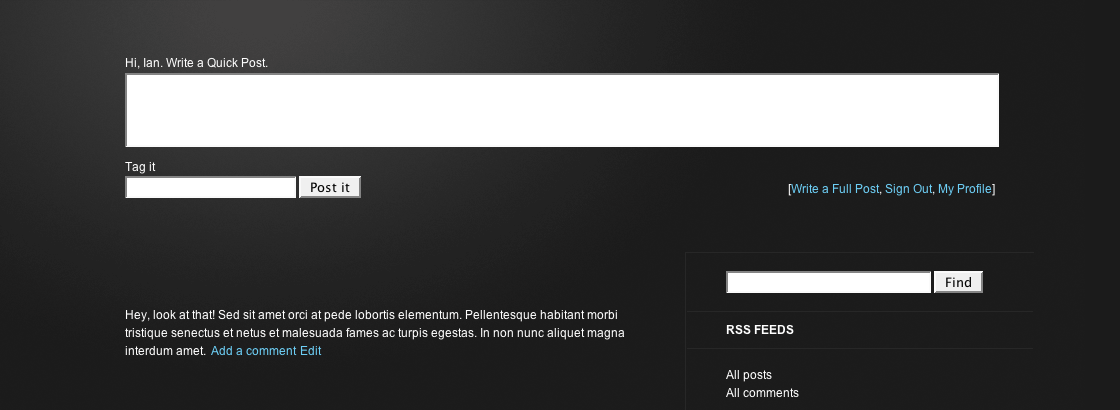
When you’re logged in, the quick-post form will appear at the top of your index page. Neat, huh?
Now, with MNML it’s crucial that you have a category called “Asides”. This category + the quick-post form + and the MNML stylesheet are going to give you some nice minimalist-looking aside posts. This is what makes MNML a tumblelog. Think Kottke.org and you’ll get what I was going for.
Fans of the Prologue theme will notice I’ve added a series of links to the form, a link to the fuller “Write Post page” in the backend as well as links to sign out and visit your profile, exactly like what’s found at the top of the Dashboard. I may not build a quick-post form into every theme but I’m definitely going to consider building those handy links in.
Find out how to add quick-posting to your own WordPress themes.
Progressive Enhancement
 Progressive Enhancement might not be the right word. Regressive Punishment? Okay, wait, maybe it’s not that bad! What I’ve done with MNML is send a separate stylesheet directly to your IE6 visitors (click on the image for a closer look). It’s actually not that bad looking. And at the very least, it certainly fits into the MNML style.
Notice the link in the top right of the header? “Still using Internet Explorer 6?” This is not an affiliate link. All it does is refer your IE6 readers to the download page for Internet Explorer. IE7’s not that bad and I figure it’s easier to convince someone to upgrade the same product rather than switch to a completely new one.
Don’t like the link? Remove it. It’s fine by me.
And speaking of Progressive Enhancement, your Safari readers get a nice little text shadow on the Blog title. You’re welcome.
Get Found and Be Heard
MNML is based on The Sandbox making it safe and search-engine optimized for WordPress. On top of that, I’ve made a few more tweaks, recommended by Chris Pearson, that will help you get heard and help you get noticed.
MNML Isn’t So Minimal, Is It?
I guess MNML isn’t so minimal after all! On top of all that, MNML is GPL licensed. That means it’s free and free forever. Do with it as you please.
One more thing about the styling: while MNML is a Tumblelog style theme it isn’t a tumblelog theme exactly. It does have an aside category but it doesn’t have any other special category styling. This is intentional. I want posting to be easy. I don’t want you to have to use and remember special formatting for each post. MNML, and tumblelogs in general, are supposed to make blogging more fun. Not more of a pain.
Have at it!
 ThemeShaper
128 responses
WHOA, I totally found a fix for the issue of being redirected to the login screen.
Just go to the index php and delete the auth_redirect(); and everything works fine as it should! I hope for the handful of folks who had an issue with it are still interested in it to benefit from this fix.
I never got this error when i added it… to my theme… again as I have posted I get a cannot modify headers error when I tracked the codex… it says to make sure there isn’t excess whitespace… in the header php but there isn’t… I am not getting any resolve <— check my blog and reg (all new reg’s are authored so u can see the quick box
Lol… I see you zeroed in on the same kewl thing I did for theme customization, well.. let me tell you… how did you overcome the cannot modify headers? try my site and see for yourself… can you guide and direct me?
[…] on the site, I recently changed to the Hybrid News theme (from Theme Hybrid). I began using the MNML theme exactly a year ago today (total coincidence, really) and I loved it the whole time. MNML […]
[…] | Download Not […]
Hi Ian! This is the best theme I have found for my blog yet. Thanks!
I have one question though; Is it possible to add the date for the post on the main page? E.g. on the side of the post title or such. It may be easy to add, but I’m not all that into WordPress.. Yet ;o)
Also, I have the same issue as BigBear above:
Also WordPress asks me if i’d like to update to a new version of MNML automatically – however when I accept the invitation I get :
Incompatible archive: PCLZIP_ERR_BAD_FORMAT (-10) : Unable to find End of Central Dir Record signature
Long on my list has been making MNML a Child Theme of Thematic. I haven’t had a chance to get to it yet but that’ll take care of any errors popping up.
Hi Ian,
great theme and I want to use it for my blog. I have one question which may seem a little “noobish”: How do I change only the color of the widgets names in the sidebar like “categories”, “archives” etc ?
[…] to try and design my own theme right away. think I’ll get my feet wet with this theme from MNML before taking out the paint brushes. This entry was written by rawberg, posted on April 18, 2009 […]
I’m sorry to post this question here, but I cannot get any question posted in the ThemeShaper forums, for whatever reason, so I’m trying here. Thanks:
Hello there:
I was trying another theme designer’s tumblelog, and loved the look of the site. But support was next to nonexistent, there were coding problems galore, etc., even though I had only done a bit of customization. I’ve done that now too, but don’t have anywhere close to the number of issues, and I’ve only been using the MNML tumblelog theme for WordPress as of an hour or so ago.
I really have only two, and one is vastly more important than the other:
1) I cannot get my archives to work, except for text. Photos and videos do not show up. This is the biggie.
2) The footer repeats everything on the sidebar. I earlier had a list of links, and those were repeated too.
My blog is located here:
http://raymikell.com/blog/
If you could at least answer 1, I would so appreciate it. Thank you for your time.
Ray
nice work with header and footer stuff
MNML theme is now listed on techthem.com
http://www.techthem.com/mnml-wordpress-theme-by-themeshapercom/
I love the theme… really great work.
There are only 2 things I want to change – the sidebar mouseover behavior (all light up, not just the one hovered) and the regular link behavior (no hover ). I’m still new to wordpress, and I was poking around in the theme files, and all I managed was to turn off mouseovers completely.
Any help would be appreciated
Hi Ian,
I’m really diggin’ this theme. I just had two questions:
1. When I embed a video (from YouTube), the video player runs over the header when scrolling in every browser except Safari. Is there a fix for this?
2. When I use the quick post, it takes me to my login screen for WP and nothing happens after I log in. How would I go about fixing that?
Thanks for a great theme!
[…] Details | Demo | Download MNML (0) AKPC_IDS += "1760,";Popularity: unranked [?] (No Ratings Yet) Loading … Bloggers Who Like This Theme, Also LikeGotham Nights – Simple WordPress ThemeJynxed – Elegant WordPress ThemeReal Estate WordPress Theme – Harmonic DivergenceWoody WordPress Theme – ModernOakSmashing WordPress Theme – EcoPressPurple Swirl – Free WordPress ThemeTomodachiSubtlyMadeCopyblogger – Smashing WordPress ThemeNatural Essence – Elegant WordPress Theme Post a Comment […]
[…] Theme Homepage » […]
[…] 31. MNML [Preview] [Donload] […]
[…] MNML, demo | download […]
[…] MNML, A TumbleLog Style WordPress Theme Something that looked and worked like the tumblelog-style WordPress theme MNML? …. I’ve updated the file and a corrected ZIP is ready for download. … themeshaper.com/mnml-a-tumblelog-style-wordpress-theme/ – Cached – Similar […]
[…] videos, images or whatever little scribbles you want to make online.Quick Post More Resources:Tumblelog WordPress Theme by ThemeshaperPockett by Nyssa J. BrownCSS GalleryMost of the CSS Galleries you find online are […]
[…] Tumblelog WordPress Theme by Themeshaper […]
[…] Tumblelog Tumblelog ist ein Plugin von Twelve Horses. Inspiriert von Thumblr. Ermöglicht das simple erstellen von Kurzmitteilungen etc. online, genau wie die normale “Post” Ware – nur eben auf der Website. Ein Design Beispiel gibts Themeshaper. […]
[…] like how the MNML theme has the bar at the bottom. I can see how in certain situations I’d like to put more […]
[…] Tumblelog WordPress Theme by Themeshaper […]
[…] videos, images or whatever little scribbles you want to make online.Quick Post More Resources:Tumblelog WordPress Theme by ThemeshaperPockett by Nyssa J. BrownCSS GalleryMost of the CSS Galleries you find online are […]
Hi,
Is there a way to remove the links below the search box? (which happen to copy the links already visible on the sidebar) I just started work on a client’s site which uses MNML (love the theme, btw), but I’m not familiar with the theme yet and was wondering if you could provide any insight.
Thanks,
Corinne
Bad thing is lack of hover effect for links.
[…] playing around with a new theme here, MNML. If you don’t see it, try using this link. You can also revert to the old theme, if […]
[…] MNML […]