

Automattic, the folks behind WordPress.com have a great quote on their company site, “Blogging is too hard.” I totally agree.
Why did you start your personal blog anyway? You wanted a place online to share things you found interesting and occasionally write a longer article, maybe even a rant. Right? Did you want to start a magazine site with 40 categories carefully arranged on a complicated home page? Or did you want a blindingly shiny site that looked like it had been attacked by a pack of floor buffers? Probably not. Did you want something simple and cool looking? Something easy to post to? Something that looked and worked like the tumblelog-style WordPress theme MNML? (What’s a tumblelog?)
Maybe. Let’s take a closer look at it.
View the live Demo or Download MNML.
Content First—Literally!
The first thing you’ll notice about MNML is the header—it’s now the footer! I think this is a great layout for a smaller blog where you don’t necessarily want to highlight reams of old content. If you’re more concerned with the immediate, highlighting what’s important to you right now, then the MNML WordPress theme might just be for you. But don’t forget, there are still search and archive pages! Your content isn’t lost.
Quick Posting At The Speed of Thought
When the Prologue theme first dropped, I zeroed-in on the in-theme posting ability it showed off. Right away I thought, “I want that!” Well, now you can have it too.
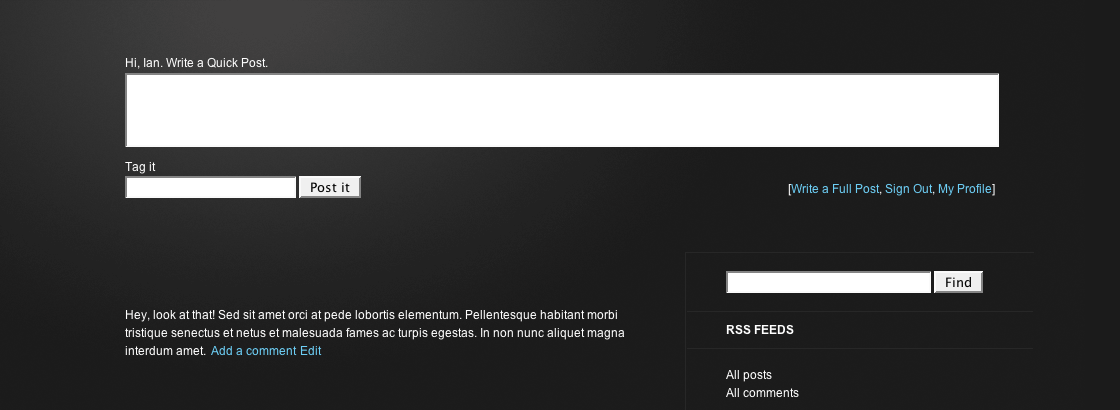
When you’re logged in, the quick-post form will appear at the top of your index page. Neat, huh?
Now, with MNML it’s crucial that you have a category called “Asides”. This category + the quick-post form + and the MNML stylesheet are going to give you some nice minimalist-looking aside posts. This is what makes MNML a tumblelog. Think Kottke.org and you’ll get what I was going for.
Fans of the Prologue theme will notice I’ve added a series of links to the form, a link to the fuller “Write Post page” in the backend as well as links to sign out and visit your profile, exactly like what’s found at the top of the Dashboard. I may not build a quick-post form into every theme but I’m definitely going to consider building those handy links in.
Find out how to add quick-posting to your own WordPress themes.
Progressive Enhancement
 Progressive Enhancement might not be the right word. Regressive Punishment? Okay, wait, maybe it’s not that bad! What I’ve done with MNML is send a separate stylesheet directly to your IE6 visitors (click on the image for a closer look). It’s actually not that bad looking. And at the very least, it certainly fits into the MNML style.
Notice the link in the top right of the header? “Still using Internet Explorer 6?” This is not an affiliate link. All it does is refer your IE6 readers to the download page for Internet Explorer. IE7’s not that bad and I figure it’s easier to convince someone to upgrade the same product rather than switch to a completely new one.
Don’t like the link? Remove it. It’s fine by me.
And speaking of Progressive Enhancement, your Safari readers get a nice little text shadow on the Blog title. You’re welcome.
Get Found and Be Heard
MNML is based on The Sandbox making it safe and search-engine optimized for WordPress. On top of that, I’ve made a few more tweaks, recommended by Chris Pearson, that will help you get heard and help you get noticed.
MNML Isn’t So Minimal, Is It?
I guess MNML isn’t so minimal after all! On top of all that, MNML is GPL licensed. That means it’s free and free forever. Do with it as you please.
One more thing about the styling: while MNML is a Tumblelog style theme it isn’t a tumblelog theme exactly. It does have an aside category but it doesn’t have any other special category styling. This is intentional. I want posting to be easy. I don’t want you to have to use and remember special formatting for each post. MNML, and tumblelogs in general, are supposed to make blogging more fun. Not more of a pain.
Have at it!
 ThemeShaper
128 responses
Thanks, mccormicky. Got that all fixed up.
[…] gestaltet. Es achtet vor allem auf die Einheitlichkeit und ist durchwegs mit Rechtecken gestaltet. MNML von Themeshaper. Ist wie das weiter unten vorgestellte WordPress Theme Prologue. Wenn man […]
[…] Demo Full details and download […]
i am using this theme for a release in mid-june.. one more question… is there a way to get only the i hover over the change color and not the entire sidebar? i have been try thing but i think i am stuck…
take care and thanks with any help.
ukre8.thevsproject.com
@guru: Do you mean the <i> element?
think so… but you notice as you bring the mouse in the sidebar the entire side changes color instead of just the link you rollover…. is that the element?
i am still relatively new to adjusting code..
thanks
[…] les amateurs tumblelogs, voici MNML, un thème WordPress ou alors Chyrp, un CMS OpenSource pour créer son propre tumblelog. Via […]
[…] MNML is the new theme powering this site. Cool, ain’t it? This entry was written by Alphonse Yu, posted on June 13, 2008 at 6:26 pm, filed under Asides. « Experimental Sandbox Testing 123. » […]
Hey Ian,
I am really diggin’ your themes. Quick question: because this is built with Sandbox, I can style the categories, correct?
Yep.
Sorry, I should have just looked. Duh. Anyway, I am going to be doing some small tweaks, but I will let you know what I come up with. This is exactly the theme I was looking for. It took a long time to find, but it was worth it.
Thanks. Let me know when you’re all done. I really enjoy seeing what people end up creating. Cheers.
[…] just activated a new theme for this site. It’s called MNML, and it’s designed especially for quick posts. As ever, I’m not quite sure about it […]
Wow – of the bajillion WP themes I’ve seen, this is the first one that feels truly thought out design wise about content :^) I love it! Great job.
Is there any way to get the date to show on posts?
MNML, A TumbleLog Style WordPress Theme…
A Tumblelog-style two columns-Theme for WordPress based on The Sandbox. With MNML it’s crucial that you have a category called “Asides”. This category + the quick-post form + and the MNML stylesheet are going to give you some nice minimalist-look…
Ian.
I very much like this theme and I am currently setting up a new blog (not public yet) and I an using this theme as of now. I am running into two issues.
1) the quick post box: when I try and use it and then click the “post it” button I get redirected to my blog login page. I do not get logged out but just redirected and the post does not created, any ideas? I can post to the Asides category no problem through the standard post screen but not through your quick post
2) I want to limit what pages are displayed in the header …errr… I mean footer but I cant seem to fins the code for it. I cant find the standard code (or Im overlooking it) that wordpress uses so that I may add the extra little bit of PHP to exclude certain page id’s, any idea?
Any help with these would be very much appreciated.
Cheers
Kevin
[…] with a lot of help by Themeshaper Ian Stewart. It’s called MNML. This entry was written by alm, posted on July 27, 2008 at 10:04 am, filed under Misc and tagged […]
I really like this theme and have just applied it to my own blog. I am very new to the wordpress theme’s and was wondering how difficult it would be to add in a blog roll to the sidebar? I have very little experience in development so I figured I should ask the guy who made it =)
Thanks, and again, great work!
@Kevin: I’m not sure what’s up with question 1, but as far as question 2 goes, check out
sandbox-functions.php.@RAGSdale: WordPress widgets. Check them out in the design section of the admin area.
Thanks for the help Ian. I found in the sandbox-functions.php file the place to limit the pages links that area shown, thanks for the direction.
As for my other issue about the quick post box its not really an issue in the end, just was curious.
Thanks again
Thanks bud! I really appreciate it – the design looks great, just want in wanted =)
Hi Iain, I’m getting exactly the same problem as Kevin’s question 1, above, and it’s only since I upgraded to WordPress 2.6.
Type into the Quick-Post box, hit “Post it”, and I get routed to my login page. I log in, and I go back to my main page, but my quick post has gone.
Good theme, though, so I’m looking forward to a fix.
I haven’t had a chance to look at this yet. Working on it. I’ll write a post when it’s updated though. Watch for that.
[…] Demo | Pagina de lansare […]
Ian:
Any ideas why all of the pages that I have published (and not private) arent showing in my header? As of now I havent altered sandbox-functions.php to exclude any specific pages, so I would assume that all pages should show, but they arent? Any ideas?
Ive done a clean install of the theme as I thought I might have altered something by accident, but thats not helping?
Thanks for any ideas you might have
Cheers
Kevin
kvl.name/blog
@Kevin: Are they Child Pages? Child Pages won’t show up in the menu of this theme (without hacking the CSS).
Ian.
Thanks for the quick response.
They aren’t child pages, so that wasn’t the issue, but I found the issue. The plugin PageMesh (http://joelstarnes.co.uk/pagemash.php) was conflicting with the way the pages display, I deactivated the plugin and the pages now display properly.
Thanks again for all the help.
Well perhaps the best photo blog child theme…. Meaning MNML
Hi Ian, just want to say thx for the mnml themes 🙂
i’m using it for my indonesian site 😀
btw the sidebar change all the color if i hover one of the item
[…] Demo / Download […]
hello Ian, great theme and i use a modified version for my site, but still have one thing i cant figure out.
all the links on the right side in the side bar ALL change color (highlight when rolled over) but i just want a sinlge link to change color upon roll over.
is that possible and if so how??? in the css i can only change the color, but not limit it to a single link.
thanks for any help
hi Ian, I really like the navigation in the footer and the fact that it stays even as you scroll through the blog. Do you think that this theme would be a good parent theme? I’m going back and forth between this and thematic.
I keep meaning to make this a Thematic Child theme. You might want to wait for that.
[…] as in Freedom – theme for self-hosted WordPress blogs nowadays. But I think I succeeded at last – MNML is the “new suit” for Random […]
[…] for something more subdued. This loamy, static look is called MNML and so far it suits my mood […]
Love the theme, just installed it, but having the same problem as Kevin and Martin McCallion with regard to the Quick Post field taking me to the blog login page and then post just disappearing.
Would love to play with this feature…. any thoughts on a fix? many thanks!
[…] the previous post, some time ago, I declared that I will settle for the wonderful theme MNML by Ian Stewart. Well – I still like it a lot. In fact, MNML is the closest […]
[…] as in Freedom – theme for self-hosted WordPress blogs nowadays. But I think I succeeded at last – MNML is the “new suit” for Random […]
[…] Geschmack: Warum mühsam eine in die Jahre gekommene Software “redesignen”, wenn man das auch einfacher haben kann (bei mir dank MNML). […]
Love this theme – I’m getting it setup on my blog http://blog.joomlabear.com.
Only one thing – can’t work out how to get the bottom menu to display… I’m a bit noobish with wordpress – will head over to the forum and see if I can solve this – I must be missing something obvious…
Ian, any idea when you will be releasing this as a child theme? I’m looking at adding the WordPress 2.7 comment enhancements to my site, but I don’t want to make changes if you are about to release anything big. Thanks!
It’s on the list … but I’m working on adding 2.7 comment enhancements to Thematic in a way that doesn’t break what’s come before. Have you tried making a MNML Child Theme for Thematic? You might find it easier than you imagine (Yes, I’m trying to pawn off work).
I haven’t tried making this into a Thematic child theme yet, but I will do that this week.
Also, just an issue with your theme here, the font in your comments section looks really strange in Google Chrome. I’m having to highlight text to be able to read it.
[…] Playing with this new wordpress theme called MNML. Gonna need to do some tweaking, but it has potential. addthis_url = […]
Hello Ian
Thanks for your theme which is really easy to enhance.
I’ve got an issue though: I have installed the NextGen gallery plugin as this wordpress blog is used as a photographer portfolio.
Galleries are showed in pages and enlarged posts but I can’t have the thumbs in any post summary.
Ex : http://www.fridayfactory.co.uk/photos/?cat=10
I tried with proper text and it worked. Seems like nextgen gallery and your theme are not happy together !
Any clues of what to do ?
Thanks
Anne.
Loving your theme. Using it over at http://blog.joomlabear.com
However I am experiencing a slight issue with HeadSpace and MNML – My titles are not being picked up, If I switch themes they are.
Also WordPress asks me if i’d like to update to a new version of MNML automatically – however when I accept the invitation I get :
Incompatible archive: PCLZIP_ERR_BAD_FORMAT (-10) : Unable to find End of Central Dir Record signature
Cheers for a great theme.
Any timeframe on when we might see gravatar and threaded comment support in MNML? Or are any new additions unplanned and off the table? I would really like to see updates to this good looking theme.
[…] demo indir […]
I absolutely love your theme and I am doing a few tweaks to make it work for my blog (thats going through a bit of a revamp). However, I am having the same issue as a few people above with the quickpost not working. I can write in it and tag it as ‘asides’ (yes I made a category for it), and clicking post it simply brings me to a log in screen and then the post is gone.
Could this possible be a wordpress 2.7 issue? It seems to be happening to people having the more recent versions of wordpress.